Notion vs Asana: Task Management, Pricing, and Integrations Compared

TL;DR
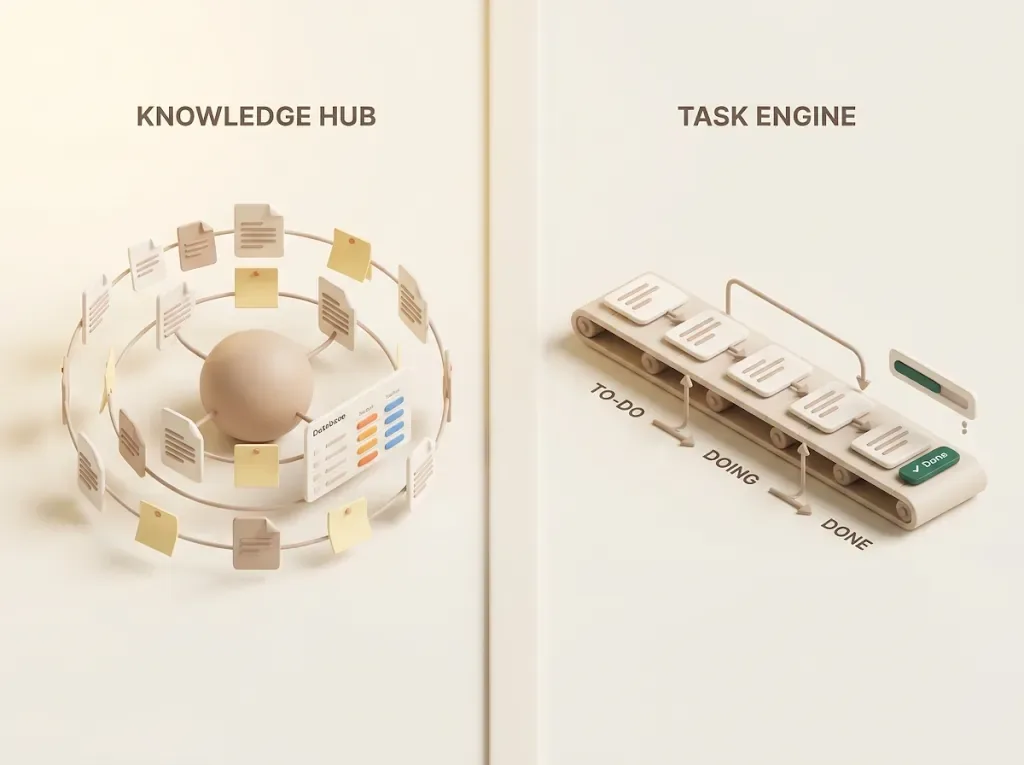
- Notion is an information hub; Asana is an execution engine. They're built on different philosophies, so pick Notion if you want documents and tasks living together, and Asana if you need strict tracking of progress, deadlines, and dependencies.
- For task management, Notion gives you a blank canvas of databases and views, while Asana ships with tasks, assignees, due dates, and dependencies built in — a trade-off between flexibility and out-of-the-box structure, not a question of which is "better."
- The two can be connected via import, synced views, and no-code tools (Zapier/Make), so for many teams the realistic answer is using both, not choosing one.
- Both apps' notifications are designed for people who log in. Clients and contractors with no Notion or Asana account are structurally unreachable — a blind spot most comparisons skip.
- Kapsel is one option to close that last gap: it watches your Notion due dates, owners, and statuses, emails people who don't use Notion, and writes a one-click reply back to Notion — without sending to items already marked done or paid.
If you're choosing between Notion and Asana for your team — or you've already picked one and are now trying to bend it into doing the other's job — you've probably noticed most comparisons just line up features side by side and stop short of what actually matters: which team should choose which, and a blind spot both tools share that nobody mentions until it bites you. Both apps' notifications are built for people who log in, which means clients and contractors with no Notion or Asana account are structurally unreachable through either one — no plan or setting changes that. This is a third-party comparison of design philosophy, task management, pricing, and integrations, plus the realistic case for running both, so you can pick with that gap already priced in. And if that external-reach gap turns out to be your only real complaint, you may not need to switch at all — see before you look for a Notion alternative to tell a fixable gap from a genuine reason to migrate.
The short answer: Notion vs Asana at a glance
Here's the conclusion up front. Notion and Asana aren't really head-to-head competitors so much as tools built for different jobs. Notion centers on documents and databases to pull information into one place — an information hub. Asana specializes in assigning work and tracking progress and deadlines — an execution engine. So the deciding factor is whether your team leans more toward centralizing information or rigorously tracking execution.
| Dimension | Notion | Asana |
|---|---|---|
| Design philosophy | Information hub (docs + databases) | Execution engine (task + progress tracking) |
| Strong at | Notes, specs, and wikis living alongside tasks | Assignment, progress tracking, dependencies |
| How you build tasks | Design databases and views yourself | Standard task/project structure exists from day one |
| Learning curve | High flexibility means you decide the structure | Opinionated defaults get you running fast |
| In-app notifications reach | Notion users / mentioned workspace members | Assignees who open Asana (Inbox) |
| External non-users | Generally not reached | Generally not reached |
| Best-fit team | Small, doc-heavy, flexible workflows | Larger teams tracking progress and deadlines strictly |
Getting this call right early matters, because the cost of a wrong pick isn't obvious until later: retrofitting a team's habits onto the other tool's philosophy means migrating documents or rebuilding a task structure from scratch, after everyone's workflow already depends on it.
💡 If you're torn between the two, decide first whether your team's main goal is "gathering information" or "tracking execution." Notion for the former, Asana for the latter — and if you want both, the "use both" section below is the realistic answer.
How Notion handles tasks
In Notion, task management is something you assemble yourself out of databases and views. A task is a row (a page) in a database, and you define due date, assignee, status, priority, and anything else as properties. You can display the same data as a table, board (kanban), calendar, or timeline, switching the view without changing the underlying data — so one task list can be shown different ways for different purposes. See Notion task management for the base structure and Notion kanban boards for the board view specifically.
The biggest strength is that documents and tasks live in the same place. You can embed a task database inside meeting notes, specs, or a wiki, or write background context directly into a task page — which cuts down on jumping to another tool to find information. It suits teams that want to manage project context and tasks as one.
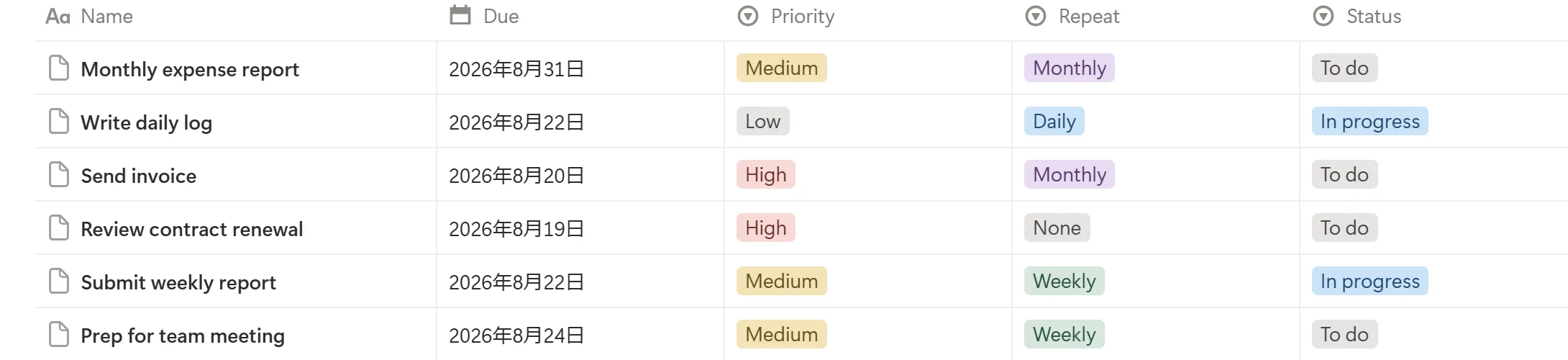
The flip side: that structure-free flexibility is also a setup cost. You have to decide which properties to use and how to run your views, and without agreed conventions, usage drifts from person to person. For keeping a team's setup coherent over time, see Notion for team tasks, and for visualizing progress, Notion progress tracking.
💡 Notion's "build it from scratch" nature is both its strength and its weakness. It's powerful for small, high-autonomy teams that can use the flexibility — but teams that want a ready-made structure may find the design work heavy.
How Asana handles tasks
In Asana, the structure — tasks, projects, assignees, due dates — is there from the start. Create a project and you immediately get list, board, timeline, and calendar views; each task can carry an assignee, a due date, subtasks, and dependencies (this task starts after that one finishes) as standard features. You don't have to design anything to reach a state where "who does what by when" is visible.
The strength is that the features for tracking progress and deadlines closely are built in. Draw dependencies and bottlenecks surface; the timeline shows how the schedule fits together; each person sees their assigned work in "My Tasks." Updates collect in each member's Inbox, where comments, reassignments, and date changes are surfaced. It suits larger teams that want to prevent things slipping through the cracks structurally.
In exchange, Asana isn't a home base for documents. Specs and knowledge can go in a task's description or attachments, but it isn't built for freely combining documents and databases into an information foundation the way Notion is. It's optimized for tracking execution. (Feature specifics and plan boundaries change; confirm current details against Asana's own documentation.)
💡 Asana's assignment, dependencies, and progress tracking are built in, so it starts up fast. In return, information consolidation and document management aren't as flexible as Notion's — its purpose leans toward "tracking execution."
Comparing notifications — the blind spot both share
Notifications get overlooked in task-tool comparisons, but in practice "did the right person notice?" is what moves work forward. Here's how the two compare, and the shared blind spot most comparisons skip.
Notion's notifications are built to get a Notion user's attention: @-mention someone and it lands in their inbox; @remind or a date-property reminder fires at a set time; database automations can trigger in-app or email notifications on changes. But all of this reaches only people with a Notion account who look at the screen — mentioned workspace members. The inbox is easy to bury if it isn't opened, and email/push aren't guaranteed to be real-time.
Asana's notifications center on the Inbox, where comments, reassignments, date changes, and approval requests for tasks you own or follow collect; email and mobile push are also available. Same premise: notifications reach Asana account holders who are the assignee or a follower of the task. The Inbox is a place inside the app, so it doesn't function as a nudge for someone who never opens Asana.
Here's the crux of the comparison. Both Notion and Asana are designed on the assumption that the recipient has an account for that service and is looking at the screen. Their notifications are for "people who open Notion" or "people who open Asana" — internal members. It isn't a matter of better or worse; it's just which app you get noticed inside.
| Dimension | Notion notifications | Asana notifications |
|---|---|---|
| Core mechanism | Inbox, mentions, reminders | Inbox, approval-task notifications |
| Who's reached | Notion users / mentioned people | Asana assignees / followers |
| Precondition | A Notion account + viewing the screen | An Asana account + viewing the screen |
| External non-users | Generally not reached | Generally not reached |
| Reply loop | A recipient's action doesn't auto-update properties | Can't reply to someone outside the tool |
⚠️ Both apps' notifications are limited to "can the account holder notice?" — so clients and contractors without a Notion or Asana account are structurally unreachable through either path. When work involves outside parties, that blind spot quietly turns into manual chase-up emails. For reaching people who don't use the tool, see external share notifications.
Pricing compared
Think about pricing not just as a monthly per-tool fee, but including the real operating cost of chasing external parties (the labor of manual emails). That keeps the judgment steady. Here we set Notion's and Asana's pricing bands alongside Kapsel as an outward-notification option.
| Tool | Role | How pricing works |
|---|---|---|
| Notion | Information hub | Free plan available. Paid is billed monthly per member, expanding features, history, and permissions |
| Asana | Execution engine | Free plan available. Paid adds timeline and advanced features, billed monthly per member |
| Kapsel | Outward-notification layer | Free $0 / Standard $12 / Pro $29 per month. Chosen by feature, not headcount |
💡 The cost that gets missed in pricing comparisons is the labor of chasing outside parties by hand. Even if the core tool is cheap, sending payment-check and reminder emails manually every time is a hidden cost. Evaluate the price of automating outward notifications against that manual cost.
Notion's and Asana's exact prices change with their own plan revisions, so confirm figures on each official page. Kapsel's pricing is Free $0 / Standard $12 / Pro $29 per month, and the free plan stays usable at $0.
Integrations and the realistic case for using both
It's tempting to think you must commit to one, but in practice many teams connect and run both. The main ways to connect them:
- Import to migrate — you can import tasks between Asana and Notion via CSV and consolidate existing data on one side.
- Sync/embed to display — pull external information into Notion for a combined view, so one tool's data is visible from the other's screen.
- Connect with no-code tools — build automations like "task completed in Asana → update the Notion page" with Zapier or Make. For the wider automation picture, see Notion automation.
Whichever method you use, the point is the same: you stop copying task status between two tools by hand, so the two systems stay close enough to trust.
The realistic both setup is a division of labor — for example, track execution in Asana and keep documents and knowledge in Notion. Run progress and dependencies rigorously in Asana while the background material and notes live in Notion; that split works for many teams. For heavier project structures, compare Notion project management and the Notion Gantt chart approach.
⚠️ Automation via connectors is convenient, but it carries its own operating costs — trigger design, message maintenance, and usage-based billing on run counts. And these connections only move information inside the Notion/Asana ecosystems; neither reaches external non-users. Even with a connector in place, outward delivery still needs a separate method.
Which one suits your team
Pick based on "does it fit my team," not on which has more features. Here's the split, plus the axis comparisons tend to miss: teams that work with outside parties.
Notion suits small, flexible teams that want to manage documents and tasks together — startups, planning/editorial teams, and one-to-a-few-person projects that want notes, specs, and knowledge in the same place as their tasks and prefer to design their own conventions.
Asana suits larger teams that want to track progress, dependencies, and deadlines strictly — production/operations groups and organizations running many parallel projects, where built-in progress tracking, dependencies, and timeline pay off.
But classifying teams by internal use alone misses teams that deal with outside parties day to day. Freelancers, agencies, professional-services firms, and small businesses often have clients, contractors, or customers on the other side of the work — most of whom use neither Notion nor Asana. In that case, whichever you pick, you're left either making the other party adopt a tool or chasing them by hand over email, and a tool-vs-tool comparison can't solve it.
| Team situation | Better fit |
|---|---|
| Small team wanting docs + tasks together and free-form design | Notion |
| Larger team tracking progress, deadlines, and dependencies strictly | Asana |
| Wanting both execution tracking and a document home base | Both (divide the labor) |
| Clients or contractors involved in the work | Either — plus a separate outward-notification layer |
💡 Fit isn't decided by "doc person vs. task person" alone. When outside parties are part of the flow, you need a third axis beyond the tool comparison: how do you reach people outside the tool?
Staying on Notion but strengthening outward notifications
As above, Notion's and Asana's notifications are both for internal members and don't reach external non-users. That blind spot isn't solved by "switching to Asana" or "keeping everything inside Notion automation" — it's solved by carrying Notion's due dates out into email that anyone can receive. Here's how Kapsel fits, described factually.
Kapsel is a Notion notification tool that watches the due dates, owners, and statuses in your Notion database, sends automatic email reminders to people who don't use Notion, and lets recipients write the status back to Notion with one click. No API, Apps Script, or external automation build required — you connect Notion and go. It sits alongside Notion rather than replacing it.

| Problem (unsolved in Notion or Asana) | Kapsel's shipped feature | Effect |
|---|---|---|
| Want to send based on due date, owner, status | Watches due/owner/status → automatic email reminder | Send to "due soon / already overdue" without waiting for a change |
| Doesn't reach external non-users | Emails reach people without a Notion account | Recipient needs no login — they just get an email |
| Notifications are one-way; status doesn't return | One-click writes back to Notion (two-way) | The recipient's action updates the status, keeping Notion current |
| Risk of dunning someone who already paid | Never sends to completed or paid items | Resolved parties drop out of scope automatically |
| Want to chase overdue items unattended | Overdue follow-ups / filtering / scheduled sends | Only overdue items, filtered by condition, on a set cadence |
| Don't know who received it / rewriting copy each time | Send logs / merge variables | History is kept; drop in name, date, and amount to reuse |
Put together, this means the due dates you already keep in Notion start reaching the people responsible for them on their own, without you writing another manual reminder email.
If you want to watch across multiple Notion workspaces, or set sender branding (company name, signature, logo), the Pro plan covers that.
⚠️ The accident to avoid most in automated outward notifications is dunning someone who already paid or finished. Because Kapsel reads status, it doesn't send to items marked done or paid in the first place. Whether "not sending" is guaranteed by default is an important axis when choosing an outward-notification approach.
Kapsel is an indie project (getkapsel.com) — it exists because chasing people manually is miserable, and the "don't send to the wrong person" guardrail is the part built most carefully.
FAQ
Notion vs Asana — which should I choose?
Decide by where your team's weight sits. If you want documents and tasks managed together with a setup you design yourself, Notion fits. If you want to track progress, deadlines, and dependencies strictly across a larger team, Asana fits. And if you want both, running them together with a clear division of labor is common.
Can Notion and Asana be connected?
Yes. You can migrate tasks via CSV import, pull information into Notion for display, or build no-code automations like "task completed in Asana → update Notion" with Zapier or Make. Note that these connections move information inside the Notion/Asana ecosystems and still don't reach outside parties who use neither tool.
Is Notion or Asana cheaper?
Both have free plans, and paid tiers are generally billed monthly per member. Figures change with plan revisions, so confirm on each official page. When comparing, weigh not just the monthly fee but the real operating cost — such as the labor of chasing outside parties manually.
What are the downsides of Notion for task management?
The main downside is that its structure-free flexibility becomes a setup cost: you design the properties and views yourself, and without agreed conventions usage drifts between people. Strict dependency and progress tracking are also less standardized than in a dedicated tool like Asana, and notifications are mainly for people who open Notion.
Is it OK to use Notion and Asana together?
Yes — because they serve different jobs, many teams run both with a split like "track execution in Asana, keep documents and knowledge in Notion." You can connect them with import or no-code tools. Even so, neither reaches external non-users, so outward delivery still needs a separate approach.
Can Notion or Asana notify people who don't have an account?
Their in-app notifications can't — inbox, push, and reminder emails all assume an account for that service. To reach someone without an account, you need an outward channel such as a connector-driven email or a tool like Kapsel, which emails the person directly and can write their one-click reply back to Notion.
Notes
Published August 22, 2026. Descriptions of Notion's standard features (databases, views, @remind, date-property reminders, database automations, mention notifications), Asana's features (tasks, projects, assignees, due dates, dependencies, timeline, Inbox, approval tasks), and integration/import/pricing here are based on each service's official documentation and general behavior as of writing. Menu names, feature scope, plan contents, and pricing change with updates, so confirm current details against each official source (Notion Help Center, Asana Guide). Kapsel features and pricing referenced here (USD: Free $0 / Standard $12 / Pro $29 per month) are current as of writing; see getkapsel.com for the latest.