Notion Alternative? Diagnose the Real Trigger Before You Switch

Before you shortlist ClickUp, Coda, or Obsidian, write down the single sentence that made you search "Notion alternative" today. Nine times out of ten it is one concrete complaint — "clients never see the update," "reporting is manual," "large pages lag" — not "Notion is the wrong platform." Naming that sentence tells you whether you need a migration or a much smaller, cheaper fix.
TL;DR
- Comparison listicles frame the choice as full tool A vs full tool B, but the real trigger is usually one narrow workflow gap.
- Migration cost is mostly time: relearning the interface, rebuilding structure, and running two tools in parallel ("paying double") for longer than planned.
- A few triggers — built-in analytics at scale, offline-first, non-US hosting, deep PM ops — are genuine reasons to migrate. Most are not.
- One of the most common triggers, "notifications don't reach people outside the workspace," is an add-on gap you can close without leaving Notion.
Before you start comparing tools, name the actual complaint
A tool comparison answers "which platform is best in general." That is rarely the question you actually have. The question you have is "what specific thing stopped working this week, and is Notion the reason?" Those are different questions with different answers, and conflating them is how teams end up spending a quarter migrating to fix a problem a settings change or a small add-on could have solved.
Curated "best Notion alternatives" lists are organized by category, and they are genuinely useful once you have confirmed you need a new platform:
| Use case | Commonly recommended alternatives | What they optimize for |
|---|---|---|
| Project management | ClickUp, monday.com, Asana | Task ops, workload, dependencies, reporting |
| Docs & wikis | Coda, Slite, Nuclino | Structured docs, fast search, lighter surface |
| Local-first notes | Obsidian, Anytype, Logseq | Offline access, files you own on disk |
| Open-source | AppFlowy, Joplin | Self-hosting, data control, no vendor lock-in |
The table above is a shortlisting aid, not a decision. Reach for it only after the self-diagnostic below confirms the problem is structural. Otherwise you are choosing a replacement for a platform that may not be the actual bottleneck.
The most common trigger behind "notion alternative" searches: notifications that don't reach outside the workspace
Here is a gap that almost every "reasons to leave Notion" listicle omits. Standard write-ups cite weak native analytics, slowness on large workspaces, no reliable offline access, rising per-seat and AI-tier pricing, workflow-specialized teams wanting a purpose-built tool instead of a general workspace, and vendor lock-in. One widely cited article lists six reasons to leave and never once mentions whether people outside the workspace hear about anything. Yet that is the exact pain that pushes freelancers, agencies, and client-facing teams to start comparing tools: the client, the contractor, or the vendor never gets nudged, so follow-ups stall and things slip.
Why this looks like a Notion problem but is actually a notification-reach problem
Notion notifications and @mentions surface to people who have a Notion account and are logged in. A client without an account, or a contractor who never opens the workspace, receives nothing proactively. Nothing arrives in their inbox saying "this is due tomorrow." So the update sits in Notion, visible to anyone who looks, and no one looks.
That feels like "Notion isn't good enough," which reads as a reason to migrate. But swapping to ClickUp or Asana reproduces the same limit: those platforms also notify their own logged-in users, not outsiders. The root cause is not the workspace tool — it is that no tool in this category proactively emails people who don't log in. That reframing matters, because it means a platform migration does not fix it, and a narrow add-on does.
💡 If your complaint contains the words "client," "contractor," "vendor," or "they never saw it," you are describing a notification-reach gap, not a platform mismatch. See why external mentions don't notify for the mechanism in detail.
Self-diagnostic: do you need a new tool, or just an external notification layer?
Map your loudest symptom to its root cause, then to the cheapest fix that resolves it. Migration should be the last column you land in, not the first.
| Symptom | Likely root cause | Cheapest fix that resolves it |
|---|---|---|
| Clients/contractors never see updates or due dates | External recipients aren't notified (access ≠ notification) | External notification layer — no migration |
| Follow-ups and reminders stall | Notion pings only logged-in users | External notification layer — no migration |
| "Who owns this?" is unclear | Process/ownership gap, not tooling | Fix the workflow (owners, statuses) |
| Duplicate updates across two tools | Overlapping tools, unclear source of truth | Consolidate; usually not a migration |
| Manual reporting eats hours at scale | Weak native analytics/dashboards | Migrate (if genuinely at scale) |
| App lags on huge workspaces/long docs | Performance ceiling | Migrate or split workspaces |
| Team needs offline / local-first access | No reliable offline mode | Migrate (local-first tool) |
| Data must be hosted outside the US | Hosting/compliance requirement | Migrate (self-host or regional tool) |
Read the table top to bottom: the first two rows — the most common triggers — resolve without touching your platform. The bottom four are the genuine structural reasons to migrate. Sorting your complaint into a row is a five-minute exercise that can save a quarter of migration work.
⚠️ If more than one symptom is "unclear ownership" or "duplicate updates," you likely have a process problem that will follow you into any new tool. Migrating a broken process just gives you a broken process in a more expensive interface.
What migrating actually costs
Migration articles quote per-seat pricing as the cost of switching. That is the smallest part. The real bill is time, and it is paid by the whole team, not the budget line.
Most migration guides lay out the same six phases: define needs, test with a data sample, set up the new tool and any sync, run both tools in parallel, transition teams gradually, then decommission the old tool. Skipping a phase is usually what turns a planned two-week cutover into a stalled multi-month project.
- Data migration — exporting, cleaning, and re-importing databases, relations, and attachments; relations rarely survive an export intact and need rebuilding.
- Relearning the interface — every person relearns where things live and how views, filters, and permissions work in the new tool.
- Rebuilding structure and workflows — templates, automations, dashboards, and naming conventions do not port over; they are rebuilt by hand.
- Re-training the team — documentation, walkthroughs, and the weeks of "where do I find X now?" questions.
Each bullet is a real block of hours. Together they routinely dwarf the subscription difference that prompted the comparison in the first place.
The "paying double" period nobody budgets for
There is one cost teams consistently underestimate: the parallel-run window. You cannot cut over instantly, so for weeks — often longer than planned — both tools stay live. You pay for both, and worse, people split their attention across two systems, which temporarily lowers productivity instead of raising it. Budget for a parallel run that lasts twice as long as your optimistic estimate, and confirm the payoff still clears that bar before committing.
When migration is genuinely the right call
Some triggers are real structural mismatches, and no add-on fixes them. If your loudest complaint is one of these, a full comparison and migration is the honest answer:
- Built-in analytics and reporting at scale — you need native dashboards and rollup reporting that Notion doesn't provide out of the box, and you have enough volume to justify a purpose-built PM tool. Compare Notion vs Asana style matrices here.
A quick side-by-side on the axes those comparisons use:
| Area | Notion | Asana |
|---|---|---|
| Task management | Databases, boards, and views built for flexible structure | Purpose-built task/subtask hierarchy with dependencies |
| Docs | Strong native doc editor inside the same workspace | Lighter doc/notes support, not the core surface |
| Automations | Basic in-app automations plus third-party integrations | Deeper native workflow automations and rules |
| Reporting/dashboards | Manual rollups; no built-in analytics dashboard | Native portfolio and workload dashboards |
| Collaboration | Comments, mentions, shared pages | Comments, mentions, task-level collaboration |
| Pricing | Free and paid tiers, per-seat | Free and paid tiers, per-seat |
| AI features | Notion AI add-on for writing and search | Asana's built-in AI for status and workload |
That table covers the axes a feature-by-feature comparison usually uses — it doesn't replace the self-diagnostic above, since most searches are triggered by one narrow gap, not this whole matrix.
- Offline-first / local-first access — field or travel work that must function with no connection points to Obsidian, Anytype, or Logseq.
- Non-US data hosting or self-hosting — compliance or policy requirements that Notion's hosting can't meet point to open-source, self-hostable options.
- Deep PM operations — time tracking, workload balancing, and resource management that a general workspace isn't built for.
These are outside what any notification add-on can address. Match the tool to the specific requirement — a docs tool won't fix a time-tracking need, and a PM tool won't give you local-first files.
How to close the external-notification gap without leaving Notion
If your diagnostic landed on the top rows — external recipients aren't reached, follow-ups stall — you can fix that in place. This is where an add-on beats a migration outright.
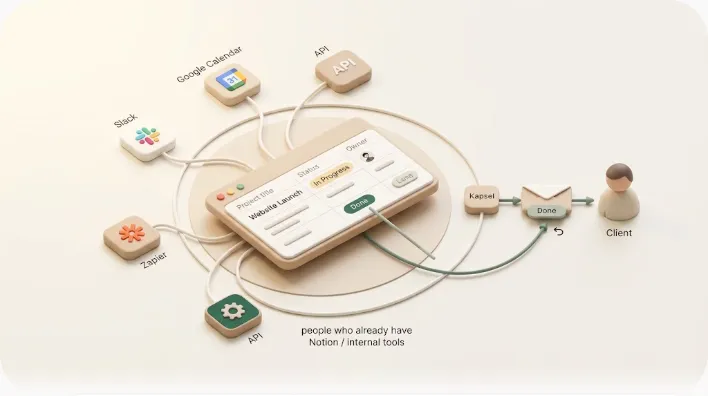
Kapsel is a tool that watches your Notion due dates, assignees, and status, and automatically emails the people involved — including clients and contractors who don't use Notion and never log in. Recipients act with one click, and their response writes back to your Notion status (two-way), so the workspace stays the single source of truth.
The shipped features that map to the "external reach" gap:
- Reaches people who don't use Notion — reminders arrive as ordinary email; no account, no login, no app required for the recipient.
- Two-way, one-click response — the recipient's click updates the Notion status, so you don't transcribe replies by hand.
- Never sends to Completed or Paid items — the safeguard that stops a paid client from getting a payment chase.
- Overdue chasing, audience filtering, recurring sends — automatic follow-ups on overdue items, sends scoped to the right rows, and scheduled recurring reminders.
- Send logs and merge variables — a record of what went out and to whom, with per-recipient personalization.
- Pro adds multiple workspaces and sender branding — company name, signature, and logo on the emails.
The benefit in one line: the platform your team already knows stays exactly as it is, and the one thing it couldn't do — proactively reach outsiders and record their reply — now happens automatically. For the client-facing case specifically, see keeping clients updated and, for money in particular, freelance payment reminders. Pricing is Free ¥0 / $0, Standard ¥1,980 / $12, Pro ¥4,980 / $29 — check the pricing page for current figures.
A smaller pilot before you commit to either path
Migration guides recommend a two-week pilot on one real workflow before you switch tools. That advice is sound — but you can run it one level cheaper first. Before you pilot a whole new platform, pilot the narrow fix on a single workflow and see whether the complaint disappears.
- Pick one workflow where the pain is loudest — say, client deliverable due dates or unpaid invoices.
- Run the add-on fix for two weeks on just that workflow, keeping everything else in Notion untouched.
- Measure the specific symptom — did follow-ups stop stalling? Did outsiders actually respond?
- Decide from evidence. If the symptom is gone, you never needed a migration. If it persists, you now have proof the problem is structural, and that is when you start the full-tool pilot.
💡 A narrow fix has a near-zero switching cost: your data, structure, and team habits don't move. That makes it the correct first experiment even if you later migrate anyway — worst case, you've ruled out the cheap option with two weeks of evidence. Notion's own automation limits are a good thing to test against during this window.
Frequently Asked Questions
Is Notion good enough for a growing team, or is it time to switch? It depends on which symptom is growing. If your pain is unclear ownership, duplicate updates, or outsiders not being reached, those are process or add-on issues that follow you into any tool. If you've hit genuine ceilings — native reporting at scale, offline access, or non-US hosting — those are structural and justify evaluating a switch.
What is the biggest weakness of Notion? There's no single answer, but the most commonly cited weaknesses are weak native analytics/reporting, slowdowns on very large workspaces or long documents, and no reliable offline mode. A frequently overlooked one is that notifications only reach logged-in Notion users, so people outside the workspace hear nothing proactively.
Do Notion notifications reach people who don't have a Notion account?
No. Notion notifications and @mentions surface only to users with an account who are logged in. Someone without an account — a typical client or contractor — receives no proactive alert. Reaching them requires an external layer that emails them directly.
How much does it actually cost (in time, not money) to migrate from Notion to another tool? The subscription difference is minor; the real cost is time. Expect hours for data export/cleanup, rebuilding templates, automations, and dashboards by hand, re-training the whole team, and — most underestimated — running both tools in parallel ("paying double") for weeks longer than planned.
Can you fix Notion's notification problem without switching your whole team to a new tool? Yes. If the gap is that outsiders aren't reached, an external notification layer solves it in place: it watches Notion and emails the people involved, and their one-click reply writes back to Notion. Your team keeps working in Notion exactly as before.
What's the difference between Notion guest access and actually being notified? Guest access is a permission — it lets someone view, comment on, or edit a space if they open it. Being notified is proactive — an alert reaches them without them logging in. Access means they can see it; notification means they are told. Guest access alone does not send reminders.
Is ClickUp or Asana better than Notion for client-facing or external work? For internal project ops they offer deeper reporting and workload features. But for reaching clients who don't log in, they share Notion's limit: they notify their own logged-in users, not outsiders. Switching platforms to fix external reach usually reproduces the original problem.
How do I know if my Notion problem is a tool problem or a process problem? Run it through the self-diagnostic table above. Symptoms like unclear ownership and duplicate updates are process problems that migrate with you. Symptoms like "no built-in analytics" or "can't work offline" are tool problems. "Outsiders aren't reached" is a tool gap that an add-on — not a migration — resolves.
Notes
- Published 2026-09-28.
- Primary sources referenced: Notion official Help & Support documentation on notifications, mentions, and guest/member permissions; publicly published "best Notion alternatives" and "reasons to leave Notion" comparison articles and migration guides.
- Kapsel's features and pricing described here are as of the publish date and may change; refer to the official pricing page for current figures.