Why Your Team Won't Update Notion — Causes and Fixes That Stick

For the first week after rollout, everyone moves their statuses. Three weeks later, cards sit stuck on "In Progress," the real updates flow through Slack or hallway conversations, and Notion quietly becomes "the place you check that's never quite current." It's the most common way a team Notion setup falls apart.
This article is for the ops leads and managers who run Notion with a team but watch adoption fade into a stale, ceremonial workspace. It lays out why updates don't stick — the root causes, not the symptoms — and fixes you can start tomorrow that don't rely on another pep talk. By the end you'll know how to diagnose which cause is yours, and how to keep updates flowing through a mechanism instead of goodwill.
TL;DR
- The main reason Notion goes stale isn't missing features — it's a process that leaves updating to each person's goodwill and memory. Most teams already have the properties and structure they need.
- There are three root causes: (1) no owner or rules for updating, (2) no mechanism to notice when a due date arrives, and (3) chasing that depends on one specific person.
- The usual fixes — a dedicated owner, mandatory status reports, better onboarding — help, but they all assume the person opens Notion. They don't reach people who don't, or external parties with no account.
- To run updates on a mechanism, pair (a) partial automation inside Notion (rollups, buttons) with (b) an external notification layer that catches only overdue items, emails a reminder, and lets the recipient write the status back to Notion in one click.
- Kapsel is a tool that watches your Notion due dates, assignees, and statuses, emails reminders to only the people who need them, and writes the status back to Notion when the recipient confirms in one click. It never sends to items marked Done or Paid, and it reaches people who don't have Notion, too.
The bottom line: it's not a feature gap, it's a "leave it to goodwill" process
Let's start with the conclusion. Most of the time, a Notion workspace that goes stale isn't held back by anything Notion lacks. The cause is a process that leaves whether an update happens to each member's goodwill and memory.
That's why switching tools rarely fixes it — the same pattern comes back. Nearly every team already has the three properties that matter (assignee, due date, status) from day one. What's missing is a rule for who updates what and when, and a path that reliably makes the owner notice a date has arrived.
💡 Key point "A more usable tool will make it stick" is usually wrong. Staleness comes from gaps in the process — ownership, rules, and a path to notice — so moving the same process to a different tool breaks in the same place. The investment that pays off is building the mechanism, not shopping for tools.
The 3 root causes your team won't update Notion
Going stale looks like a vague "people just stopped using it," but broken down, it almost always collapses into three causes. Figure out which one is yours and the fix gets much clearer.
| Root cause | What it looks like | What doesn't work | What does |
|---|---|---|---|
| 1. No owner or rules | Databases with fuzzy ownership pile up; update timing varies by person | "Let's all be careful" announcements | A named owner ("Notion czar") and written rules |
| 2. No way to notice | Due dates pass unnoticed; only people who open Notion get told | Manually eyeballing the board | Automatic overdue detection plus email |
| 3. Chasing is one person's job | One person chases everyone by voice or chat, with no record | Relying on that person's stamina | Automated nudges with a send log |
1) No one owns updating, and there are no rules ("Notion czar" missing)
Staleness starts when no one owns the act of keeping things current. "Everyone uses it" quietly becomes "no one designs or maintains it," and the more databases you add, the more lawless it gets.
The fix here is what teams often call a "Notion czar" — one person named as the workspace owner. This person handles database structure, sets naming and status-option conventions, maintains page templates, and makes the call when something's ambiguous. One person with clear responsibility keeps order better than everyone contributing a little care.
Alongside that, write the minimum update rules on a single page. Even just three — "always move the status when you start and when you finish," "always set a due date," "review your own items weekly" — cut down the variation. Without rules, everyone invents their own way of using the database, and the same field starts meaning different things to different people.
2) Due dates and assignees are left to "I'll do it when I notice," with no way to notice
The second cause is that nothing gives the owner a path to notice a due date has arrived. You can put a date on a task, but if that person isn't in Notion that day, no one sees it. "I'll handle it when I notice" is, flipped around, a design where "if I don't notice, it sits there."
It helps to be clear-eyed about how Notion's native notifications work. Mentions and reminders generally surface when that person opens Notion and looks — so they effectively don't reach a member who rarely opens the app, and they never reach an external party at all. "I set up a notification, so we're covered" isn't quite true; success depends on whether the recipient has the habit of checking Notion.
So the fix isn't "set more reminders." It's to build a separate path that lets the owner notice a due date without opening Notion. We get concrete on that later. If you want to dig into why native notifications only reach the person who opens the app, why Notion tasks get ignored covers the notification-design angle. This article picks up from there and focuses on the process-side causes: ownership, rules, and dependence on one person.
3) Chasing depends on one person doing it by voice or chat
The third cause is that the job of chasing has quietly attached itself to one person. A manager or a project lead goes around asking "hey, where's this at?" one by one, over voice or chat. It looks like it's working — but it's the most fragile setup you can have.
There are three problems. First, it burns that person's time and emotional energy, week after week. Second, chasing feels awkward, so it gets put off, and things slip through. Third, there's no record of who was chased, when, and how many times, so it turns into he-said-she-said. Person-dependent verbal chasing simply stops during a week when that person is busy or away.
⚠️ Caution "It runs because the person chasing is reliable" isn't a mechanism — it's dependence on an individual. One transfer, resignation, or busy stretch and the whole thing collapses. The better it works informally, the harder it is to see how urgently you need a mechanism.
The deeper mismatch: leadership and the team don't agree on what it's for
Underneath those three causes there's often a deeper, shared mismatch. Leadership or the person championing Notion adopts it to "see the whole company's status in one place," while for individual members that goal doesn't translate into a benefit they feel — so all that's left is the update work, felt as double entry.
When the champion only talks about "visibility" and never translates it into "here's how this makes your job easier," members have no reason to treat updating as their own. Leave that mismatch in place and no amount of naming an owner or writing rules will fully take, because the team never buys in. When you set an owner and rules, also write down — in words aimed at the team — what the update is for and whose benefit it serves. That's what makes the responsibility and the mechanism actually work.
The usual fixes and their limits (dedicated owner, mandatory reports, better onboarding)
Three fixes come up again and again for staleness. All three are worth doing. But they share the same blind spot.
| Common fix | Benefit | Limit |
|---|---|---|
| Name a dedicated owner ("Notion czar") | Clear responsibility; the database stays orderly | Load rises on the owner. If they also chase, the person-dependence comes back |
| Make daily/weekly reports in Notion mandatory | Updating gets built into the workflow; the habit forms | Only enforceable on internal members who "open and write." Reports can go ceremonial too |
| Build it into onboarding | New members work update-first from day one | Doesn't change existing members' habits. Doesn't apply to external parties |
Why "better process" alone won't solve the "people who don't open Notion" problem
What these fixes have in common is that they all assume the member opens Notion. Name an owner, mandate reports, strengthen onboarding — the effect only kicks in once the person logs in and does something.
In reality, some people don't open Notion much: sales and field staff who live in email and chat, and above all external clients and vendors who have no Notion account at all. Process and habit arguments don't reach them as-is.
💡 Key point The usual fixes raise the quality of how "people who open Notion" work. They're useful, but "people who don't open Notion" and "external parties with no account" are out of scope. That group needs a separate path that delivers the due date without the person opening Notion. This is the angle most "how to fix adoption" articles miss.
How to run updates on a mechanism
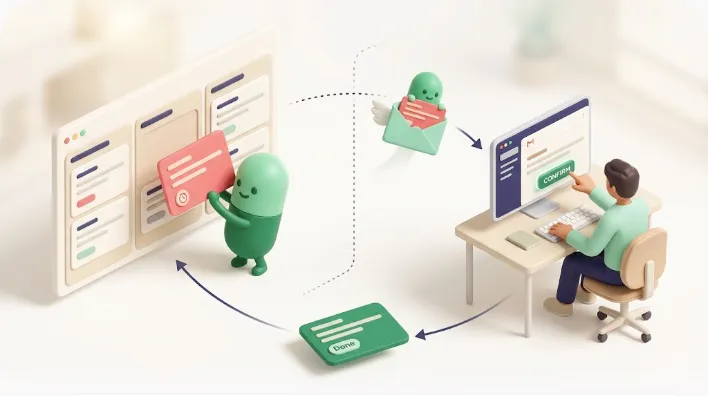
Here's the concrete part: how to run updates on a mechanism instead of goodwill. Think of it in two layers — (a) partial automation that stays inside Notion, and (b) a notification layer that delivers due dates outside Notion. Here's the whole picture first.
Start with (a). Partial automation inside Notion reduces the number of steps to update, which heads off "too much hassle, I'll skip it." Two mechanisms carry most of the weight. First, rollups aggregate the completion rate of child tasks up to the parent, so progress is visible without anyone hand-editing the parent's status. Second, buttons bundle several actions into one tap — a single "Start" button can change the status, set the assignee, and fill the start date at once. Fewer steps, lower barrier to updating. For how to think about this kind of in-Notion automation, see Notion automation.
But (a) alone leaves the "person doesn't open Notion" problem intact. Rollups and buttons only fire once someone opens Notion and acts. So you layer (b), the notification layer, on top. Here we'll use Kapsel as the example and walk through how each of its features closes a specific cause of staleness.
Catch only overdue items and email a reminder (drop the "must open Notion" assumption)
Kapsel watches your Notion due dates, assignees, and statuses, automatically detects tasks that match a condition such as overdue, and emails a reminder. The key is that the notification lands in email. Even if the recipient never opens Notion, the due date reaches the inbox they already check.
That addresses cause 2 (no way to notice). "I'll do it when I notice" becomes "the due date comes to me when it arrives," so members who don't open Notion still get told when something is overdue, and less slips. It also removes the need for anyone to eyeball the board.
Send to a filtered set (don't blast everyone)
Kapsel lets you narrow who gets a reminder and when. You can limit sends to conditions like "past the due date," "a specific assignee's tasks," or "tasks in a specific status."
Blast everyone and people start getting notifications that aren't theirs, learn to ignore "another one," and the notifications themselves go ceremonial. Filtering means each person gets just "the one item I'm responsible for," which keeps the notifications effective. For designing how progress gets shared with stakeholders, Notion progress tracking is a useful companion.
The recipient writes the status back to Notion in one click (updates land without the owner opening Notion)
Kapsel's emails include a path for the recipient to write the status back to Notion in one click. The recipient can mark something "Done" from the email itself, and the result reflects in Notion.
This matters for adoption because it removes the need to open Notion just to update. The old path — see the notification, open Notion, find the right page, change the status — had several steps, and people dropped off along the way. With a one-click confirm reflecting the update, even people who don't open Notion daily, and external parties, can at least complete the act of updating. For designing reminders per assignee, Notion team task reminders goes deeper.
Never send to Done or Paid (a safeguard so you don't lose trust to a misfire)
Kapsel doesn't send reminders on tasks already marked Done or Paid. This isn't a convenience feature — it's a safeguard for trust.
The thing you most want to avoid when automating chasing is a misfire: a "still waiting on this" nudge going to someone who already handled it, or a client who already paid. It only takes once to badly damage the relationship. Excluding Done and Paid means that even with automation on, you can hold the line of "never send to someone who shouldn't get it." It's easy to overlook when you're systematizing chasing, but it's often the deciding factor in whether a team is willing to automate at all.
Keep a send log — make the once-verbal chasing visible ("who, when, how many times")
Kapsel keeps a send log. A record of who was reminded, when, and how many times means the chasing that used to vanish into voice and chat becomes visible.
That addresses cause 3 (person-dependent chasing). Chasing that lived in one person's memory and stamina becomes a shareable record, which helps prevent he-said-she-said and double nudges. Automated sending itself moves the chaser role from an individual to a mechanism, so nudges don't stop during a week when that person is away. For patterns of recurring reminders, Notion recurring reminders is worth a look.
When external parties (clients, vendors) are the wall
The cause of staleness isn't always internal. In agency and client work, the bottleneck often sits with an external party — waiting on assets, waiting on approval, waiting on payment. And external clients and vendors usually don't have a Notion account at all.
In this case, the internal fixes (dedicated owner, reports, onboarding) do nothing. The other side won't open Notion — they can't. The old fallback was one person chasing by email or phone, one at a time, which is exactly where the awkwardness and person-dependence concentrate.
Here again, a mechanism that emails the due date and lets the recipient write back to Notion in one click does the work. The external party never logs into Notion — they respond entirely from the email they received — so internal task management and external back-and-forth consolidate into one Notion. For notifying people who don't use Notion, Notion external share notifications and Notion email reminders get concrete.
💡 Key point When you say "the team won't update," include external parties in "the team" and your options widen. Internal: login-based fixes plus a notification layer. External: notification layer only. That split is what works in practice.
A checklist you can start tomorrow (process + automation together)
Fixing staleness runs on two wheels: process (people, rules) and automation (mechanism). Either one alone breaks. This order tends to produce results.
- Name one owner ("Notion czar"). Concentrate database structure, naming, status-option conventions, and ambiguous calls in one person. Responsibility gets clear.
- Write update rules on one page. Two are enough to start: "always move the status when you start and when you finish," and "always set a due date." That alone cuts down a lot of the variation.
- Start each database with one purpose and the minimum properties. Don't load everything up front — run with assignee, due date, and status, and add more only when you need it. Less input burden, higher adoption.
- Reduce in-Notion steps with automation. Use rollups to auto-aggregate parent progress and buttons to bundle several updates into one tap. Heads off "too much hassle, I'll skip it."
- Set up a path that emails overdue items automatically. So the due date reaches the person without them opening Notion. That removes the need to eyeball the board yourself.
- Exclude Done and Paid, and keep a send log. Prevents trust-damaging misfires and moves chasing from a person to a mechanism.
- Do a monthly cleanup. Make reviewing un-updated pages, de-duplicating info, and archiving stale items a once-a-month ritual. Stops the pile-up from rebuilding.
⚠️ Caution Try to do the whole checklist at once and the effort itself goes ceremonial. Lock in 1–3 (process) first, then 4–6 (automation), then 7 (ongoing improvement) — rolling them out a week or two at a time is realistic.
For building the overall shape of team task management, see Notion team tasks; for the basics of reminder design, how to set reminders in Notion.
FAQ
Why won't my team update Notion?
The main cause isn't a feature gap — it's a process that leaves updating to each member's goodwill and memory. Even with the assignee/due-date/status structure in place, tasks slip if there's no rule for who updates when and no path for the owner to notice the due date. First set an owner and rules, then build the way to notice. That order matters.
What makes a Notion rollout go stale?
Three causes stand out: (1) no owner or rules for updating, (2) no mechanism to notice when a due date arrives, and (3) chasing that depends on one specific person. On top of that, if leadership and the team disagree on what it's for, the team feels the update as pure overhead and adoption never takes.
How do I get a team to adopt Notion?
Don't make it complex up front. Start with one purpose and the minimum properties (assignee, due date, status), and build updating into existing workflows like daily reports or onboarding. Instead of relying on goodwill or habit, create a path where the update happens naturally. Add fields after it's working, not before.
What does a Notion owner ("Notion czar") actually do?
As the workspace owner, they handle database structure, naming and status-option conventions, page templates, and the call when something's ambiguous. But if they also carry all the chasing, person-dependence comes back — so shift the nudging to automation and let the owner focus on design and upkeep. That's what's sustainable.
How do I stop Notion tasks from being ignored?
Turn "I'll do it when I notice" into "the due date comes to me when it arrives." If overdue items reach the owner by email without them opening Notion, and they can update in one click, action happens without depending on the habit of opening the app. Sending to a filtered set, rather than everyone, keeps the notifications from getting buried.
Why doesn't my Notion parent task update automatically?
Because a parent's status doesn't change automatically from its children's state. If you want to reflect children's completion rate on the parent, use a rollup; if you want to update the status itself in bulk, use a button to bundle several actions into one. Both cut down manual editing — but both still assume someone opens Notion and acts.
How do I nudge someone who won't update Notion?
It depends on whether they open Notion. For internal members who do, mandatory reports and onboarding help form the habit. For people who rarely open it, or external parties, drop the "must open Notion" assumption: a mechanism that emails the due date and lets them write back in one click is what works. Filtering to the right people, rather than blasting everyone, keeps it from being ignored.
What if we don't have anyone to run Notion?
Start by naming one owner even part-time, and writing update rules on a single page. If you're short-handed and can't keep up with chasing, add an external notification layer that automates overdue nudges and keeps a send log — that helps prevent missed follow-ups even without a dedicated owner.
Notes
- This article was published on 2026-09-12. The content reflects the state of things at the time of writing.
- The behavior of Notion's native notifications (mentions, reminders), rollups, buttons, and database automations referenced here is based on the Notion Help Center (notion.so/help) as the primary source. Specifications may change on Notion's side.
- The Kapsel features described here (watching due dates, assignees, and statuses; overdue nudges; filtered sends; one-click write-back to Notion; excluding Done and Paid; the send log; email to external parties) and its pricing (monthly: Free $0 / Standard $12 / Pro $29) reflect the state at the time of writing. Check the official site (getkapsel.com) for the latest. Kapsel is a tool built by an indie developer, offered as a notification layer that complements Notion from the outside.
- This analysis of causes and fixes is a synthesis of general operational experience and does not guarantee results. Adapt it to your team's size and the nature of your work.