Why Deadlines Get Missed in Notion: 5 Causes and Fixes (Build a System That Notices, Not Willpower)
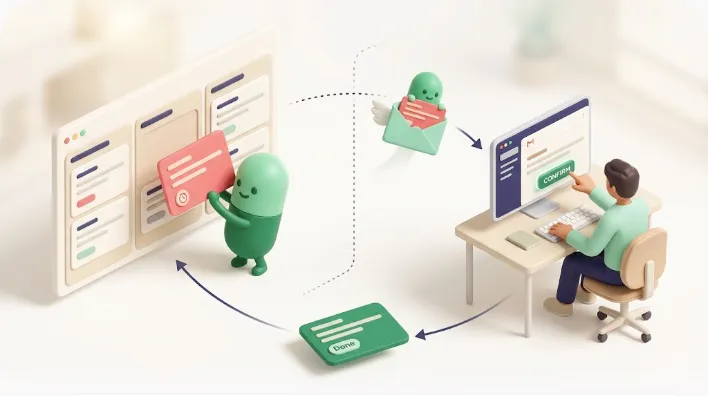
You set the due-date property, you assigned an owner — and the deadline still slipped. Most of the time this isn't an individual willpower problem; it's that the mechanism to notice the deadline is missing. A deadline you merely set doesn't get met. It only works once you've designed for it to arrive — at the right time, in front of the right person, in a form they'll actually notice.
This article is for anyone managing tasks or a team in Notion who keeps losing deadlines to slips and misses. It breaks the "won't get met" problem into five structural causes and pairs each with a fix, and by the end you'll be able to pinpoint which cause is costing your team its deadlines and prioritize what to fix first.
TL;DR
- When deadlines set in Notion get missed, the cause usually isn't "the team doesn't care." It's a structural gap: there's no mechanism to notice a deadline in time.
- The problem breaks into five causes — (1) tasks aren't in one list, (2) confusing the due date with when to start, (3) vague ownership and priority, (4) native notifications aren't built to make people notice, and (5) the psychology of not acting even when notified.
- Notion's native notifications have structural limits. They only reach the person who set them or workspace members, they fire on the date alone — so they keep going after completion and never reach people outside Notion.
- Kapsel is a notification tool that watches your Notion due dates, assignees, and statuses, emails reminders — including to people outside your workspace — and writes the status back to Notion when the recipient confirms in one click. It never sends to items already marked Done or Paid.
Tips articles tend to stop at setup steps, and task-management think-pieces rarely engage with Notion's specific mechanics — so this sits in the middle, connecting how the tool actually behaves to why deadlines slip.
The 5 reasons deadlines set in Notion get missed (overview)
The reasons deadlines slip fall into five buckets. In most real teams, several of these happen at once, not one in isolation.
| # | Cause | What's happening | Direction of the fix |
|---|---|---|---|
| 1 | Tasks aren't in one list | Unwritten tasks and scattered dates fall through | Consolidate into one DB with due date / owner / status |
| 2 | Due date vs. start date confused | The deadline is visible but "when to start" isn't | Hold "due date" and "work window" as separate properties |
| 3 | Vague ownership and priority | Who owns it and what comes first is unclear, so no one owns it | Name one owner, mark priority, build a "my tasks" view |
| 4 | Structural limits of native notifications | Alerts reach only the account holder, keep firing after completion, don't reach outsiders | Design the notification path to reach outside Notion |
| 5 | Procrastination | Notified, but nobody acts; chasing is uncomfortable | Turn the alert into a trigger for action; systematize chasing |
💡 Key point: Causes 1–3 can mostly be handled by design and process inside Notion; causes 4–5 require engaging with the nature of Notion's notifications themselves. If you've tidied up the first half and deadlines still slip, your bottleneck is in the second half. Use this table to place your own team's situation and pick the next cause to tackle.
Let's take each in turn.
Cause 1: Tasks aren't in one list, and nobody holds the full picture
The most basic reason deadlines slip is that tasks were never written down in one place. Dates scattered across people's heads, chat threads, and one-off note pages can't be caught by any amount of added notifications. An invisible task is, for practical purposes, a nonexistent one — and so is its deadline.
On a team, this shows up as everyone tracking tasks in different places while the lead can't see the whole. Because no one can see at a glance who's holding how many tasks or which are near due, an overdue item is only discovered after the fact. And when the list isn't tied to ownership and progress, handoffs stall too: if there's no way to signal "my part is done" to the next person, the previous stage's completion never reaches the next — and that "I handed it off / I never noticed" gap becomes the bottleneck.
The fix is to consolidate tasks into a single database with, at minimum, the three properties date (due), assignee, and status. With those three, you can uniquely answer "whose task, due when, in what state?" — and every downstream view and notification runs off that same basis.
💡 Key point: The concrete setup steps for consolidating, view design, and native reminders aren't this article's focus — Notion deadline tracking covers those in detail. This article stays on the root-cause analysis of why deadlines slip.
Cause 2: Confusing the "due date" with "work time," so no one can see when to start
Even with everything in one list, a common reason deadlines slip is confusing the due date with the work time. The "due date" you put in a Notion date property is when it must be finished, not when to start. Manage only the due date without distinguishing the two, and the deadline stays visible while the start gets pushed to the last minute — until there's no time left.
This is fatal for anything that can't be finished in a day. If the deadline is Friday but the work takes three days, you actually needed to start by Wednesday — but the due-date property shows none of that. The day you should have started is invisible to everyone, and on the due date itself you discover no one had begun.
The fix is to hold the "due date" and the "work window" (start–end) as separate properties. With a date-range property, a timeline (Gantt) view lets you see overlapping stages and start dates at a glance, making "when should this begin?" visible.
| How you hold it | What becomes visible | Best for |
|---|---|---|
| Due date only (single date) | Just the deadline; the start date is invisible | Deliverables, one-off short tasks |
| Due date + work window (range) | The deadline and the start-to-finish window | Production work, multi-day tasks |
A realistic path is to start with a single due date and add the range property once multi-day tasks pile up.
Cause 3: Vague ownership and priority, so nothing becomes "mine"
A task where "whose job is this?" is fuzzy tends to miss its deadline. When the assignee property is blank, or a task is just loosely shared with several people, responsibility diffuses into "someone will get to it" — and in the end no one moves. A deadline is only met once it becomes someone's own. Behind this there's often a more structural problem: the team never agreed on how ownership and priority are set, or how progress gets reported. Without those rules, even the lead can't fully see each person's load and progress, and an overdue item gets written off as "an individual problem."
At the same time, an absence of priority drives misses too. When every task sits flat in one list, each person decides for themselves what to do first — and near-due tasks get pushed back. A list where urgency and importance are invisible stops working as it grows.
The fix has three parts:
- Name exactly one owner per task — make responsibility unambiguous.
- Add a priority property (High / Medium / Low) — so everyone judges "what's first" by the same standard.
- Build a "my tasks" view filtered to the assignee — so each person sees only their own tasks, sorted by nearest deadline.
💡 Key point: Once ownership and priority are explicit, designing per-assignee automatic reminders on top pushes "it's mine" further. For the thinking on per-owner reminders, see Notion team task reminders; for making progress visible, Notion progress tracking.
Cause 4: Notion's native notifications aren't built to make people "notice" (a structural limit)
If deadlines still slip after you've handled causes 1–3, the bottleneck is the structural nature of Notion's notifications themselves. This isn't something design or process can work around — it's worth understanding as a property of the built-in feature.
Notifications reach only "the person who set them" or "@mentioned workspace members"
Notion's native reminders (date-property reminders and @remind) reach the person who set the reminder or workspace members who were @mentioned. In other words, the reach is, in principle, limited to "people who open that Notion."
And to notice the alert at all, you generally need the Notion app open (or Notion's email/push notifications turned on). For someone who doesn't open Notion day to day, or who has notifications muted, a reminder effectively doesn't arrive. "I set the notification but no one noticed" usually traces back to this reach problem.
⚠️ Caution: "The alert came but no one noticed" and "it never arrived at all" have different causes. The former is display settings or notification fatigue (cause 5); the latter is the reach limit (this section). For sorting out which, see why Notion notifications aren't working.
It fires on the date alone, so it keeps sending after completion — and there's no built-in way to keep chasing overdue items
Notion's native reminder fires, in principle, based only on the value of the date property. Whether the task is done isn't considered. As a result, alerts can keep firing on tasks that are already finished, which erodes trust in the notifications. Once people read them as "the done ones ping too," even genuinely important alerts start getting ignored.
The other limit: there's no built-in mechanism to keep chasing an overdue item. A reminder fires once, at the set time; recurring dunning like "if it's past due and still open, ping again tomorrow" isn't part of the native feature set. Miss it on the due date and it tends to sit there unnoticed. For the thinking on recurring nudges, see Notion recurring reminders.
| Nature of native reminders | What results |
|---|---|
| Fires on the date alone | Alerts fire even on completed / handled tasks |
| One-time by default | No continued chasing after the due date passes |
| Reach limited to the workspace | Doesn't reach outsiders / non-Notion users |
These aren't misconfigurations — they're design properties of the tool. Teams add Slack forwarding or GAS-based patches precisely to fill this gap, but even then the reach stays at "whoever watches that Slack or Notion."
Cause 5: "Notified but doesn't act" — the psychological causes (procrastination, awkward chasing)
Even with the mechanics in place, what's left last is the psychological and behavioral layer. "The alert arrived but nobody moved" belongs here.
The classic one is procrastination. While there's slack before the deadline, it's "still fine, later," and an incoming alert gets closed with "I'll do it later." This is likeliest when a task is too big and the bar to start is high — and it eases when you break tasks into "something I can start right now" units.
Another is the awkwardness of chasing. Even knowing something is overdue, when the other party is a colleague, a manager, or a client, chasing in person is uncomfortable, so the nudge is delayed. With external parties especially, "I don't want to hurt the relationship by nagging" kicks in, chasing gets left to whoever feels like it, and the deadline quietly becomes ceremonial.
And then notification fatigue. As covered above, alerts that keep firing after completion, or alerts with no sense of importance, pile up until the whole notification stream is learned as "safe to ignore" — and real deadline alerts get missed with everything else.
| Psychological cause | Background | Direction of the fix |
|---|---|---|
| Procrastination | The task is big; the bar to start is high | Break it down; build in schedule slack |
| Awkward chasing | It's uncomfortable for a person to chase directly | Hand chasing to a mechanism (automatic reminders) |
| Notification fatigue | Too many needless alerts have eroded trust | Exclude completed items; keep only necessary alerts |
💡 Key point: Awkward chasing and notification fatigue both stem from the very structure of "a person does the chasing." Systematize the chasing and design it to "never send to what's already done," and you improve both the trustworthiness of the alerts and the emotional load at once.
The limit that still remains: it doesn't reach outside vendors or non-Notion users
However fully you resolve causes 1–5 internally, one limit remains: the deadline never reaches anyone outside Notion in the first place. Even the top search results rarely mention this, but in practice it's a major driver of deadline slips.
The people who need to hit a deadline aren't only internal members. The client sending assets, the vendor owing a review, the customer who needs to pay — most of them don't use Notion. Because native Notion notifications are built to reach "workspace members," a reminder structurally cannot reach an external party with no Notion account.
The result: on any stage that involves an outsider, "we're managing the deadline but the other side has no idea" — and that gap turns into idle wait time and missed delivery dates. This one can't be solved by improving internal process; it's a limit of the tool's reach itself.
⚠️ Caution: External reach isn't closed by "running Notion harder." You have to widen the notification path to a channel the other party checks daily — usually email. This point is also covered in reaching non-Notion users outside your workspace.
Addressing the root cause: design the notification path outside Notion (email)
The common root under cause 4, cause 5, and the external limit is that the reach and trustworthiness of notifications stay confined inside Notion. To unlock it, you have to design the notification path outside Notion — to the email the other party checks every day.
Kapsel is a notification tool that watches your Notion due dates, assignees, and statuses, emails reminders — including to people outside your workspace — and writes the status back to Notion when the recipient confirms in one click. It's an independent, indie-built product that adds a layer on top of Notion, not a Notion feature. Each of its capabilities maps directly onto the native limits above: reach, "keeps firing after done," and "no continued chasing."
It reaches outsiders, both ways (a recipient's one click writes back to Notion)
Because Kapsel's reminders arrive by email, the recipient needs no Notion account and no login. Clients and customers who don't use Notion get the deadline directly. And because the recipient can write the status back to Notion with one click on a button in the email, "did they handle it?" reflects on the Notion side. The notification doesn't dead-end as one-way traffic — the other party's action becomes the task's progress.
A "never send to Done or Paid" design that prevents misfires
Because Kapsel judges sends by status, not the date alone, it doesn't send reminders to tasks already marked Done or Paid. This maps straight onto the cause-4 limit of "fires on the date alone and keeps sending after completion" and the cause-5 issues of "notification fatigue and awkward chasing." It prevents the misfire of a nudge landing on someone who already finished or already paid, and keeps the notifications trustworthy.
Overdue chasing, filtered targeting, scheduled digests, a send log, and merge fields (systematizing the operation)
As a system for meeting deadlines, Kapsel offers the following. Each one replaces "a person does the chasing" with "a mechanism does the chasing."
| Capability | What it does | Why it matters to you |
|---|---|---|
| Overdue chasing | Keeps reminding recipients who are past due and still open | You stop being the one who has to remember to follow up |
| Filtered targeting | Limits sends by assignee, status, or condition, so only the right people get them | No more explaining "ignore that, it's not yours" — people only see what's actually theirs |
| Scheduled digests | Sends the target tasks together on a fixed cadence, e.g. weekly | Replaces a manual Monday-morning status check with one email that's already waiting |
| Send log | Records who was sent what and when, so you can trace the chasing | When someone says "I never got that," you have the answer in seconds, not a guessing match |
| Merge fields | Inserts the recipient name, project, due date, etc. per task to personalize the content | Recipients recognize their own task at a glance instead of skimming a generic template |
On the Pro plan, Kapsel also supports managing multiple Notion workspaces and sender branding (company name, signature, logo).
How to start
Getting started with Kapsel is quick once the Notion side is ready.
- Consolidate tasks in Notion — prepare a database with the three properties due date, assignee, and status (the fix for causes 1–3).
- Connect Notion to Kapsel — specify the database to watch.
- Set the send conditions — narrow the targets by conditions like "near / past due" and "status is not done."
- Check the notifications and put it into operation — confirm delivery in the send log, and tune the cadence of digests and chasing.
You can try the whole flow — a deadline actually arriving by email and a one-click write-back to Notion — on the free plan ($0). For designing team task management overall, see Notion team tasks; for the basics of the notification path, how to set reminders in Notion.
💡 Key point: Kapsel doesn't replace "the operation inside Notion" (causes 1–3); it's a layer that adds "reach outside Notion" (causes 4–5) on top. Get consolidation, ownership, and priority in order first, then widen the reach of your notifications — that order works.
Summary (a cause → fix table to review)
Deadlines slip in Notion not from "low motivation" but from a structural gap: the absence of a mechanism to notice. Mapping a fix to each cause:
| Cause | Main fix | Where it's handled |
|---|---|---|
| 1. No single task list | Consolidate to one DB with due date / owner / status | Design inside Notion |
| 2. Due date vs. start confused | Hold "due date" and "work window" separately | Design inside Notion |
| 3. Vague ownership / priority | One named owner, priority, a "my tasks" view | Operation inside Notion |
| 4. Structural limits of native alerts | Widen the path to email; exclude completed items | Reach outside Notion |
| 5. Procrastination | Break down, systematize chasing, restore trust in alerts | Systematizing |
| The external reach limit | Deliver to outsiders by email, both ways | Reach outside Notion |
Causes 1–3 are addressed by Notion design and process; cause 4, cause 5, and the external limit are addressed by widening the reach of notifications. Kapsel handles the latter — a notification layer that doesn't send to completed items and reaches outsiders by email, both ways.
FAQ
How do you actually meet deadlines in Notion task management?
Design not just to set deadlines but to notice them. Concretely: (1) consolidate tasks in one DB with due date, assignee, and status; (2) separate the "due date" from the "start date (work window)"; (3) make ownership and priority explicit; and (4) put in place an alert that automatically makes people notice as the deadline nears. The base principle is to meet deadlines by mechanism, not by individual willpower.
Why don't Notion reminders repeat? (a native limit)
Because Notion's native reminder is designed to fire once, at the time you set. Recurring dunning like "if it's past due and still open, ping again tomorrow" isn't part of the native feature. When you need continued chasing, you have to design overdue re-reminders with an external notification tool.
What's the root cause of a team missing deadlines in Notion?
Usually two things: "no agreed sharing / reporting rules" and "no mechanism to notice." When tasks are scattered in each person's own place so no one sees the whole, ownership and priority are vague, and deadline alerts reach only the account holder, individual effort can't keep delivery on track. The fix is to systematize consolidation, explicit ownership, and notification design.
Why do Notion notifications get missed or overlooked?
Mainly two reasons. One is the reach problem: native alerts are built to reach "the account holder who opens Notion and workspace members," so they effectively don't reach people who don't open Notion daily. The other is notification fatigue: when alerts keep firing after completion and carry no sense of importance, the whole stream gets ignored.
How should I handle a team member who keeps missing deadlines?
Before blaming the individual, review the mechanism. If a task is too big to start, break it down; if the start date is invisible, make the "work window" visible; if they're not noticing alerts, provide a path they'll actually notice. If chasing is delayed because it's awkward, hand the chasing to an automatic reminder mechanism instead of a person — you meet deadlines without straining the relationship.
Why don't Notion notifications stop after a task is completed?
Because Notion's native reminder fires, in principle, based only on the date-property value and doesn't consider whether the task is done. As a result, alerts can fire on finished tasks too. Use a mechanism that judges sends by status (done or not), and you can stop notifications on completed items.
How do I tell a deadline to a vendor or external party who doesn't use Notion?
Since native Notion alerts are built to reach workspace members, outsiders need a different path. Delivering via the email they check daily is the reliable route: with a tool like Kapsel that emails automatic reminders and lets the recipient write back to Notion in one click, you can convey deadlines to outsiders two-way, with no login required.
Can Notion alone handle deadline management for a whole team?
Consolidation, view design, and native reminders can all be built in Notion alone. But the reach and trust limits — "alerts keep firing after completion," "no continued chasing," "doesn't reach outsiders / non-Notion users" — can't be fully closed by Notion alone. On stages involving outsiders, or when you need continued chasing, adding an outward-facing notification layer is the practical move.
Notes
- This article was published on 2026-09-20. The Notion features and specifications described, and Kapsel's features and pricing (Free $0 / Standard $12 / Pro $29), reflect the state at the time of writing; check each service's official information for the latest.
- The behavior of Notion's native reminders, date properties, automations, and notifications is based on the Notion Help Center as the primary source. Specifications may change.
- This is an informational article that objectively organizes "why deadlines get missed in Notion." It does not guarantee any particular operational result or effect. Adapt the fixes to your team's structure and the nature of your tasks. Kapsel is a tool built by an indie developer, offered as a notification layer that complements Notion from the outside.