Notion Client Sign-Off Reminders for Freelance Developers: Get UAT and Delivery Approval Without Chasing

You shipped the milestone, sent the staging link, and now you are refreshing your inbox waiting for a client who does not use Notion to say the word "approved." For a solo or contract developer whose project lives in a Notion database, the coding is not the bottleneck — collecting acceptance testing and delivery sign-off from a client who defaults back to email is. This article lays out a repeatable, status-driven way to get that sign-off without turning yourself into an unpaid project manager who re-chases every milestone by hand.
TL;DR
- Notion is the right place to track delivery status, but a shared Notion page does not email the client — Notion notifications only reach signed-in workspace members.
- Make delivery status the single source of truth (e.g.,
In development → Delivered / In review → Approved / Changes requested), and drive reminders off that status instead of tracking dates by hand.- Close the loop end to end: an automatic email reaches the client, they click Approve or Request changes with no Notion account, and the click writes the status back to Notion.
- Use explicit approve/request-changes language and a timestamped record so an "approved" build cannot quietly become unpaid revisions later.
For the freelance dev whose project lives in Notion but sign-off still happens by hand
The reader here is specific: a freelance or contract developer who runs client work out of a Notion database — features, milestones, staging links, due dates — but whose acceptance and delivery sign-off still happens through manual "did you get a chance to review it?" messages over email or chat. The payoff of fixing this is not "nicer emails." It is a system where the reminder fires itself, the client answers in one click, and Notion records the decision — so you stop being the human cron job between your own database and your client's inbox.
The rest of this guide follows one order: why a shared page does not get you a sign-off, how to set up status as the source of truth, how to get the nudge into the client's inbox and the answer back into Notion, a side-by-side comparison, and the sign-off pitfalls freelancers hit even when the tooling is good.
Why a shared Notion page doesn't get you a sign-off
State it once, plainly, as a premise rather than a discovery: Notion notifications are scoped to workspace members. Sharing a page — even with "anyone with the link can view" — does not itself send an email to the recipient, and an @mention only reaches someone who is signed into that workspace. A client who does not have a Notion account gets nothing in their inbox.
This is why non-technical clients quietly route around Notion. Faced with creating an account, learning an unfamiliar UI, and hunting for where to click "approve," most clients default back to the channel they already live in: email or a messaging app. The friction of the tool becomes the reason the sign-off stalls. The fix is not to force the client into your workspace — it is to send the ask to where they already are, and to bring their answer back.
💡 Share a single page or filtered view with the client instead of granting workspace access. It keeps the approval ask frictionless for them and keeps your workspace private. But remember: a shared view is something the client has to remember to open. It does not chase itself.
Set up delivery status as the one source of truth, not the reminder itself
Before automating anything, fix the architecture. The tool matters less than having one database with clear statuses that everything else reads from. Ad hoc chasing — a Slack ping here, an email there — leaves no canonical answer to "where is this milestone?" A single status field does.
Statuses that map to a real delivery lifecycle
Use status names that mirror how contract dev delivery actually flows, so the current state is unambiguous at a glance:
| Status | Meaning | Who acts next |
|---|---|---|
| In development | You are building the milestone | You |
| Delivered / Ready for review | Staging or preview link is live; UAT can begin | Client |
| Changes requested | Client flagged issues in acceptance testing | You |
| Approved | Client signed off; ready for go-live / invoice | You |
The benefit: because "waiting on the client" is now a distinct status (Delivered / Ready for review), you can automate reminders against exactly that state — no manual scanning for who owes you a review.
What to log per milestone
A status is only useful if the row carries enough context for both a reminder and a dispute record. Log, at minimum:
- Deliverable and version — e.g., "Checkout flow v2" — so the client knows precisely what they are approving.
- Client contact (email) — the external address the reminder goes to.
- Due date / review-by date — the date the reminder cadence keys off.
- Staging or preview link — so the client can review in one click, not hunt for the build.
💡 A "definition of ready" checklist (kickoff scope, deliverable definition, review-by date agreed in advance) cuts most of the back-and-forth before you ever reach the sign-off step. The fewer open questions at review time, the faster the "approved."
Getting the nudge into the client's inbox — and the answer back into the database
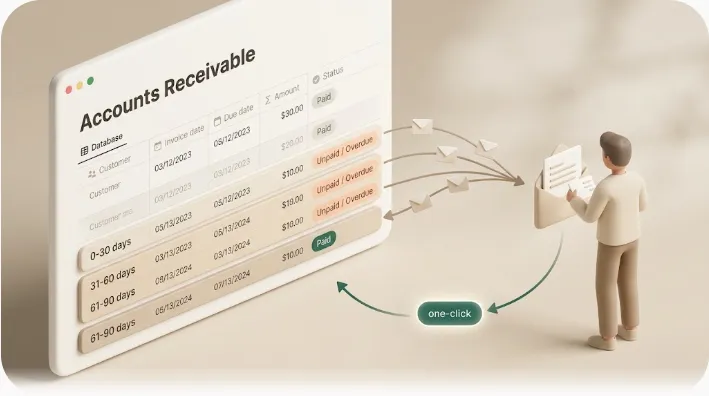
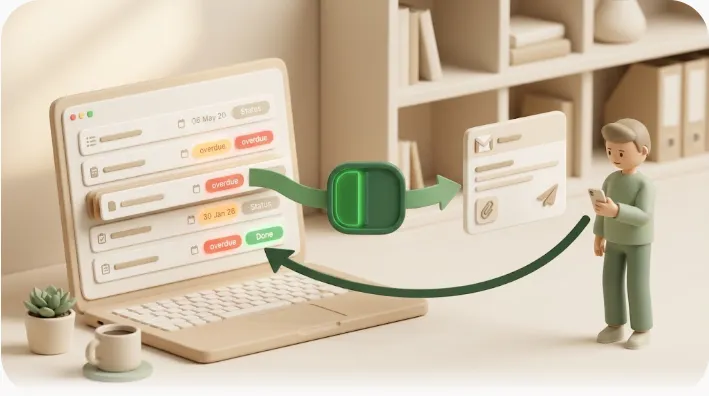
This is the part no generic guide closes: getting the reminder out to a non-Notion client and getting the decision back into the database automatically. Kapsel is an independent, solo-built tool that watches your Notion due dates, assignees, and statuses and sends automatic email reminders to the people who need to act — including external clients who do not use Notion — then writes their one-click response back to Notion.
Automatic email reminder when a review is overdue
Kapsel monitors the status and review-by date on each milestone and sends the reminder itself when a review is overdue — you do not track dates in a spreadsheet or set calendar alerts. The benefit for a contract dev: the follow-up on a quiet client happens whether or not you remember it, so a staging link a client left unopened for four days does not silently become a slipped go-live.
One click for the client — no Notion account, no portal login
The email gives the client a plain choice: Approve the deliverable or Request changes. They act directly from the email — no account to create, no separate portal to log into. Because the friction is near zero, the client is far more likely to actually respond, which is the whole point of the exercise.
The click writes the status back to Notion automatically
When the client clicks, the milestone's status in Notion updates — Approved or Changes requested — without you copying anything over. Your database stays the record of truth: one glance tells you which milestones are signed off and which are still waiting, across every project.
The guardrail that builds trust: it stops once something is Approved or Paid
Kapsel never sends to items already marked Completed or Paid. This matters more than it sounds: the single fastest way to damage a client relationship is an automated reminder that keeps nagging after they already approved or paid. The guardrail means you can leave the automation running without the risk of pinging an already-signed-off client — the reason many freelancers hesitate to automate chasing at all.
⚠️ Automation that keeps emailing after the answer is already in is worse than no automation. Confirm your "done" states (Approved, Completed, Paid) exclude a row from further sends before you turn reminders on.
Comparison: manual chase vs. shared Notion page vs. automated two-way reminder
| Manual email/chat chase | Shared Notion page/view | Automated two-way reminder | |
|---|---|---|---|
| Effort to send each nudge | You write and send every time | You re-ping; page won't email | Fires automatically from status |
| Client needs an account? | No | Effectively yes, to be notified | No |
| Timestamped sign-off record | Only if you save the thread | Manual (you edit the status) | Yes — the click is logged |
| Does Notion update itself? | No, you edit it | No, you edit it | Yes — click writes back |
| Cost of forgetting a follow-up | High — milestone stalls silently | High — client never sees it | Low — reminder is scheduled |
The takeaway: manual chasing and a shared page both leave you as the moving part. The two-way pattern removes you from the loop between database and inbox — which is exactly the labor a solo developer cannot scale.
Where this saves a contract dev the most time: several client projects at once
A one-off email template helps for a single review. It does not scale to a freelancer running four client projects in parallel, each on its own review cadence. Because Kapsel reads the status and the per-row details, each reminder is personalized with merge variables — deliverable name, project, due date, client contact — from the row itself. One rule covers every project instead of one hand-written email per milestone. The benefit: your follow-up workload stays roughly flat whether you are running one client or five.
For managing the wider client pipeline — proposals, active work, and invoicing — in the same database, see tracking sales and follow-ups in Notion. And the same reach-outside-Notion mechanic that delivers a sign-off request is covered in depth in notifying people outside your Notion workspace.
Avoiding the sign-off pitfalls freelancers hit anyway
Good tooling will not save a vague ask or a missing record. Two pitfalls sink contract developers regardless of stack.
Ambiguous "let me know what you think" vs. an explicit approve / request-changes ask
"Let me know what you think" invites a comment, not a decision — and a comment does not close a milestone. Ask for an unambiguous action instead. Put the explicit language in the request itself:
Milestone: Checkout flow v2 — Ready for review
Staging link: https://staging.example.com/checkout

Please choose one:
  [ Approve deliverable as final ]
  [ Request changes ]

Approving confirms this milestone as accepted and ready for go-live.
The benefit: a binary, worded choice turns a fuzzy "looks good I guess" into a recorded decision you can act and invoice on.
Keeping a record so "approved" work can't turn into unpaid revisions later
A documented, timestamped sign-off is what protects you when a client later asks for "just one more tweak" to work they already accepted. When the approval is a logged click that stamped the Notion status rather than a line buried in a chat thread, you have a clear record of what was approved and when. That record is the difference between a paid change request and an unpaid revision. For the downstream step — turning an approved, delivered milestone into a paid invoice — see payment reminders for freelancers, and for a sign-off tracker patterned specifically around approvals, Notion approval reminders.
How to get started
- Structure the database. Add a
Statusfield with the delivery lifecycle above, plus columns for deliverable/version, client email, review-by date, and staging link. - Write the ask in explicit terms. Frame every review request as "Approve as final" or "Request changes," not "let me know."
- Automate the reminder off status. Point a reminder at the
Delivered / Ready for reviewstate so overdue reviews chase themselves, and confirmApproved/Paidrows are excluded. - Let the click close the loop. The client's one-click response writes the decision back to Notion, keeping the database as your record of truth.
Kapsel's Free plan is $0 and not a time-limited trial, so you can try the flow above on a real client project before paying anything. Standard is $12/month for higher send volumes, and Pro is $29/month and adds multiple Notion workspaces plus sender branding (company name, signature, logo) — useful once you are running sign-off across several client accounts. See the pricing page for full details.
Frequently Asked Questions
How do I get a client to sign off on work in Notion without giving them an account?
Send the approval request to the client's email with a one-click Approve / Request-changes action, so they never open Notion. A tool like Kapsel emails the client based on your milestone status and writes their click back to the Notion status, so the sign-off lands in your database without the client creating a login.
Does Notion send email notifications to people outside the workspace?
No. Notion notifications are scoped to signed-in workspace members, and sharing a page (even publicly) does not by itself email the recipient. Reaching an external client who does not use Notion requires something that sends outbound email, such as Kapsel.
What is the best way to track client approval status in Notion?
Use a single database with an explicit status field that maps to your delivery lifecycle — for example In development → Delivered / In review → Approved / Changes requested. Keeping status as the one source of truth lets you both see the current state at a glance and drive reminders off it, rather than chasing ad hoc across email and chat.
How do freelancers automate reminders for overdue client approvals?
Key the reminder off the "waiting on client" status and its review-by date, so the nudge fires automatically once a review goes overdue. Kapsel monitors that status and sends the email for you, removing the need to track dates manually or set calendar alerts per milestone.
What should a UAT or delivery sign-off record include for a freelance contract?
At minimum: the deliverable and version, the staging or preview link that was reviewed, the client contact who approved, the explicit approve/request-changes decision, and a timestamp. A logged, timestamped decision — rather than a line in a chat thread — is what protects you if scope is disputed later.
How do you stop clients from requesting free revisions after they've already approved the work?
Capture the approval as an explicit, timestamped decision tied to a specific deliverable version, so "approved" is unambiguous and recorded. When a client later requests changes to already-accepted work, that record lets you treat it as a new, billable change request rather than an unpaid revision.
How do you follow up with a client who is ignoring a review request?
Set an overdue cadence: an initial reminder around the review-by date and a follow-up after it passes, since an external client may take days to open a staging link. Automating this off status means the follow-ups happen on schedule without you re-sending each one — and, importantly, stop the moment the client responds.
Can Notion be connected to send automatic emails when a task status changes?
Notion itself does not email people outside the workspace, so this requires an external service. Kapsel watches your Notion statuses and due dates and sends the emails automatically, then writes the recipient's one-click response back to Notion — a two-way loop rather than a one-way notification.
Notes & sources
Published 2026-09-17. This article references Notion's official help documentation on sharing, permissions, and notifications (notifications reach signed-in workspace members; sharing a page does not itself email a non-member), and general practitioner guidance on freelance client sign-off, acceptance testing, and approval workflows. Kapsel's described features (automatic email reminders to external recipients, one-click approve/request-changes, write-back to Notion, exclusion of Completed/Paid items, merge variables, multiple workspaces and sender branding on Pro) and pricing (Free ¥0 / $0, Standard ¥1,980 / $12, Pro ¥4,980 / $29, tax included where applicable) are current as of the publish date; see the official pricing page for exact, up-to-date figures.