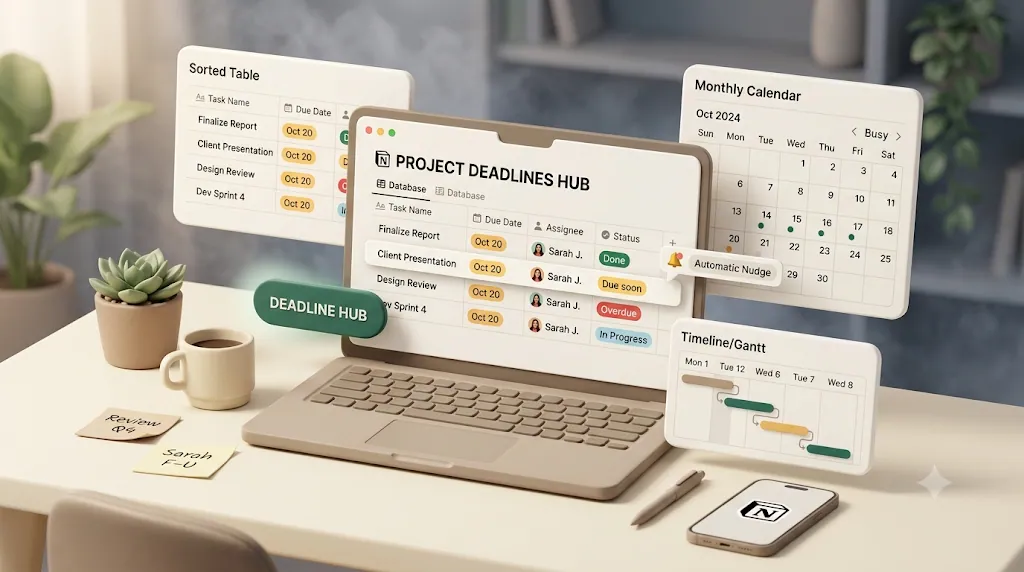
Automate Notion Reminders and Notifications: Native Notion vs Slack vs Zapier vs Make vs Google Apps Script vs Kapsel

If you already know you want Notion reminders on autopilot, the real question isn't whether to automate—it's what to build it on. Native Notion, Slack, Zapier, Make, Google Apps Script, and Kapsel can all send a reminder; they differ on who they can reach, how much upkeep they demand, and whether a reply flows back into Notion. This guide times, tests, and compares all six side by side, so you can pick the one that fits your situation instead of over-building for a job a free native automation already covers.
TL;DR
- For pings that only need to reach people already inside your workspace, Notion's native database automations or the Notion–Slack integration are usually enough and cost nothing extra.
- Zapier and Make are the flexible middle ground when reminders need to touch other apps—but due-date triggers aren't native to the Notion API, so both need workarounds, and community reports of automations passing a test then failing live are common.
- Google Apps Script is the free, code-it-yourself route for teams with a developer willing to maintain a script long term.
- Kapsel is the option built specifically for Notion due-date/assignee/status reminders that reach people outside Notion by plain email—and its one-click confirm writes the status back into Notion without you maintaining a second inbound flow.
Kapsel is a Notion notification tool that watches a database's due dates, assignees, and status, emails reminders to anyone—including clients or vendors with no Notion account—and writes their one-click confirmation back into your Notion database. That external reach plus two-way write-back is the gap the other options leave open.
Quick answer — which option fits your use case
Every tool below can send a reminder. They differ most on who they can reach and whether the recipient can respond back into Notion.
| Option | Cost | Setup effort | Reaches non-Notion people | Two-way status update | Recurring digests |
|---|---|---|---|---|---|
Native Notion (automations + @remind) |
Free (in your plan) | Low | No (workspace members / guests only) | N/A (in-app only) | No native recurring reminder |
| Notion + Slack | Free–low (Slack seats) | Low–medium | No (Slack members only) | No | Via extra tooling only |
| Notion + Zapier | Free tier, then paid by task volume | Medium | Yes, if you build an email step | Only if you build a second inbound flow | Yes, with scheduling steps |
| Notion + Make | Cheaper per operation than Zapier | Medium–high | Yes, if you build an email module | Only if you build a second inbound flow | Yes, with scenario building |
| Google Apps Script | Free | High (code) | Yes, if you code it | Only if you code it | Yes, with time-driven triggers |
| Kapsel | Free / $12 / $29 per month | Low (point at a database) | Yes, plain email, no login | Yes, one-click confirm built in | Yes, built-in mode |
💡 Read this table by job to be done, not by "which is best." A tool that's overkill for internal pings can be exactly right for client-facing follow-ups, and vice versa.
What "automating Notion reminders" actually covers

Before comparing tools, it helps to name the moving parts. Most reminder automations watch one or more of three things in a Notion database and act when a condition is met.
- Due date — remind before, on, or after a date in a Date property.
- Assignee — notify the specific person in a Person property.
- Status — trigger when a Status/Select property changes (or doesn't change).
The tools in this guide plug into those signals differently. Native Notion and Slack read them inside Notion's own ecosystem. Zapier, Make, and Apps Script read them through the Notion API and then hand off to another channel. Kapsel watches the same three properties but is designed to deliver outside Notion and record a reply. Keep that framing in mind as you read each option.
Option 1 — Notion's native reminders and database automations

Start here, because for a lot of teams the native tools are all you need and there's nothing extra to buy or maintain.
@remind and the Date property "Remind" toggle
Notion has two built-in reminder mechanisms:
@remindinline reminders — type@remindin any text block and pick a time. Notion nudges you at that moment.- The Date property "Remind" option — on a database Date property, you can set a reminder offset (for example, "1 day before") so Notion notifies you relative to that date.
⚠️ Notion's reminder notifications go to the in-app badge, desktop/mobile push, and an email fallback—but the email fallback generally only fires when Notion is closed. If someone keeps Notion open, or push is muted, the nudge can quietly go unseen. Native reminders assume the recipient is an active Notion user.
Database automations + "Send mail to…" action
Notion's built-in database automations let you define a trigger (such as a property changing) and an action. One available action is "Send mail to…", which sends an email when the automation fires. This is the no-third-party-tool baseline: it lives entirely inside Notion, with no external connector. For the full rundown of what native automations can do across all three layers, see Notion automation.
It's genuinely useful for simple cases—"email me when status changes to Blocked," for example. The catch is scope.
Where it falls short
- No native recurring reminders. There's no built-in "remind every Monday until done" mode; native reminders are one-shot around a date.
- The native mail action is Gmail-only. The "Send mail to…" action only sends through Google's mail, so it doesn't help if your team runs Outlook or another provider.
- It only reaches people already in your workspace. Native reminders and automations are designed for members and guests, not for a client or vendor who has no Notion account.
For internal, in-Notion nudges, native automations are the right first stop. See our guide for setup basics.
Option 2 — Notion + Slack
If your team lives in Slack, routing Notion activity into a channel is often the least friction.
Best for: internal team pings on status changes
Notion has a native Slack integration, and you can also push Notion events into Slack through Zapier or Make. A status change or a new database item can drop into the right channel where the team already looks all day. For "keep everyone in the loop," Slack works well—it's fast, visible, and requires almost no behavior change.
Limits: Slack seats only, no external recipients, no write-back
- Slack members only. A client or contractor without a seat in your workspace won't see the message.
- No external recipients. Slack is an internal channel by design; it isn't a way to reach someone by plain email.
- No write-back. A Slack ping is a one-way notification. The recipient can react or reply in Slack, but that reply doesn't update the Notion status by itself.
Slack is an excellent internal layer and a poor external one. That's not a flaw—it's just a different job.
Option 3 — Notion + Zapier
Zapier is the default bridge when a reminder has to leave Notion and land somewhere else—Gmail, Slack, SMS, or another app.
Typical setup (trigger → filter → action)
A common Zap looks like:
- Trigger — "New Database Item" or "Updated Page" in Notion.
- Filter — only continue if, say, status is still "In progress."
- Action — send an email (Gmail/Outlook) or post to Slack.
For cross-app pipelines, this is powerful and well documented.
Known friction
⚠️ Due-date triggers aren't native to the Notion API. Zapier can watch for new or updated items, but "the due date is tomorrow" isn't a first-class trigger—you typically approximate it with scheduled runs plus filters, which adds moving parts.
Two more realities show up repeatedly in community threads:
- Zaps that pass testing but fail in production. A Zap can work perfectly in the editor's test step and then behave differently on live data—a well-documented, recurring pain point in community threads.
- Ongoing cost and maintenance. Zapier bills by task volume, so high-frequency reminder checks can get expensive, and every schema change in Notion is a chance for the Zap to break.
Zapier shines for genuine multi-app workflows. For "just remind people about Notion deadlines," it can be more plumbing than the job needs. If email delivery is the core need, compare it against a dedicated approach in Notion email reminders.
Option 4 — Notion + Make
Make (formerly Integromat) is the more flexible—and usually cheaper—alternative to Zapier.
Typical setup (Watch database items → iterator/aggregator → action)
A Make scenario often uses the "Watch database items" Notion module, then routes the data through an iterator (to handle multiple rows) and sometimes an aggregator (to bundle them), before an email or messaging action. Make prices by operation, which frequently works out cheaper than Zapier at volume, and its visual builder exposes more control.
Known friction
- Bundle and data-formatting quirks. Working with Make's "bundles," iterators, and aggregators is powerful but fiddly; getting the data shaped correctly is a common sticking point.
- Per-app quirks. Chat/messaging steps can trip over things like chat IDs and field mapping.
- More scenario-building than "automation." In practice you're designing and maintaining a small integration, not flipping a switch. One community thread shows a user struggling just to get a twice-daily digest working—recurring escalation is treated as a custom build, not a mode.
Make is the right pick when you want Zapier-style flexibility at lower cost and don't mind the steeper learning curve.
Option 5 — Google Apps Script + Notion API
If you have a developer and want zero recurring subscription cost, you can code it.
What it takes
- A Notion API integration token, stored in Script Properties (not hard-coded).
UrlFetchAppcalls to the Notion API to read the database and update pages.- A time-driven trigger to run the script on a schedule (say, every morning).
Because the script talks to the Notion API directly, it can both read due dates and write status back—so, like Zapier or Make, two-way updates are possible here too, if you build that write-back logic yourself.
Best for: teams with a developer willing to maintain a script long-term
💡 Apps Script is free and endlessly customizable, but "free" means your team's maintenance time. API changes, token rotation, quota limits, and edge cases all land on whoever owns the script. It's a great fit when that person exists—and a liability when they leave.
Option 6 — Kapsel: built specifically for Notion due date / assignee / status reminders
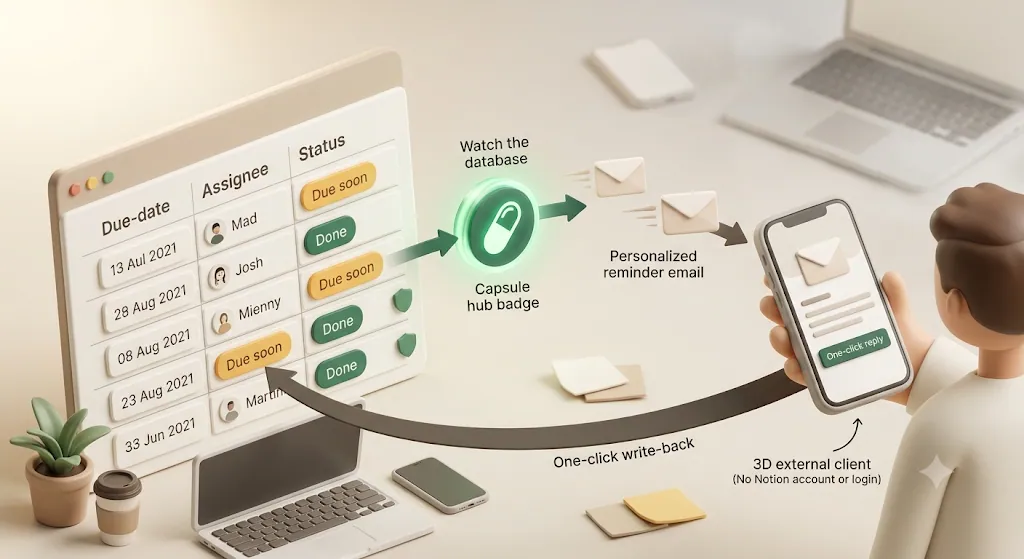
The tools above are general-purpose. Kapsel is narrow on purpose: it does one job—Notion reminders that reach people and come back with an answer.
Point it at a database, no flow-building
You connect Kapsel to a Notion database and tell it which properties to watch (due date, assignee, status). There are no triggers, filters, iterators, or scripts to assemble. The trade-off is scope: Kapsel does Notion reminders, not arbitrary cross-app automation.
Reaches people who don't use Notion — plain email, no login required
This is the core gap the others leave open. Native Notion, Slack, Zapier, Make, and Apps Script all assume the recipient has a Notion account, a Slack seat, or is manually CC'd. Kapsel emails the reminder to anyone—a client, vendor, or contractor—with no Notion account and no login needed. It's built for notifying people outside your workspace.
One-click confirm writes the status back to Notion (two-way)
Every other option pushes a notification outward. Kapsel's reminder email includes a one-click confirm that writes the status back into your Notion database. Zapier or Make could technically approximate this, but only by building and maintaining a second, inbound flow (parsing replies or handling webhooks)—exactly the kind of setup that community threads say tends to break. Kapsel handles that loop for you.
Never sends to completed or paid items
💡 When reminders are external-facing, chasing someone for something they already finished—or already paid—looks unprofessional. Kapsel suppresses sends to items marked completed or paid, so nobody gets a "please pay your invoice" email after they've paid. None of the other options treat this as a built-in safeguard.
Overdue follow-ups, target filtering, recurring digests, send log, merge fields
Several things that are edge-case custom builds elsewhere are built-in modes in Kapsel:
- Overdue follow-ups — automatic escalation after a date passes.
- Target filtering — narrow down which records get reminders.
- Recurring digests — scheduled summaries without assembling a scenario.
- Send log — an audit trail of what was sent and when, which matters when the recipient is outside your team.
- Merge fields — personalize each email (name, item details) rather than sending a generic blast.
Together these five turn "I built a reminder" into "I built a reminder system" — the difference between a one-off Zap and something you can point at a whole invoice or renewal database and trust.
Free / Standard / Pro, and where Pro fits
Kapsel has three tiers: Free ($0), Standard ($12/month), and Pro ($29/month). Pro adds multiple Notion workspaces and sender branding (your company name, signature, and logo), which is the relevant upgrade when reminders go to external parties and should look like they came from your business. See pricing for the current breakdown.
Kapsel is built by an independent developer, and the roadmap reflects that narrow focus rather than an attempt to be an all-in-one platform. For deadline-specific workflows, Notion deadline tracking goes deeper.
Measured setup time (minimal build)
To ground the comparison in something concrete, we timed how long it took to build the same minimal setup in each tool from scratch—sending one reminder for one Notion task on its due date. These are first-time, minimal-setup figures; they vary with familiarity and how complex your requirements get.
| Tool | Setup time (minimal, first build) |
|---|---|
| Native Notion | ~2 min |
| Slack | ~5 min |
| Zapier | ~15 min |
| Make | ~20 min |
| Google Apps Script | ~90 min |
| Kapsel | ~3 min |
The pattern is clear: the config-only options (native Notion and Kapsel) were fastest, the no-code connectors (Zapier/Make) sat in the middle, and the most flexible option (Apps Script) took by far the longest to build—and still needs ongoing code and token maintenance afterward. This measures initial build time only; in production, weigh it together with the maintenance costs below.
💡 These are our own hands-on measurements (a one-task/one-email minimal setup, first build, as of 2026). The more requirements you add, the more the DIY options (Zapier/Make/GAS) stretch—widening the gap with native features or a purpose-built tool.
Common pitfalls (where each tool trips people up)
The flip side of the comparison table is knowing where each option tends to bite in real use. These are limitations widely documented in each tool's help center and user communities (specs change, so confirm the current behavior before you commit).
- Native Notion: email reminders tend to arrive in a batch when Notion has been closed for a while rather than in real time, and recurring reminders aren't supported natively (Notion lists this as roadmap), so repeating nudges need a workaround.
- Slack: it's easy to over-notify, which buries the messages that matter. Reaching people outside your org requires a Slack Connect invite or shared channel, so it's a poor fit when the recipient changes per project.
- Zapier: the Notion API can't trigger directly on "a due date arrived," so people fake it off a
page updatedtrigger—and zaps that pass in testing but fail once published are a common report. Task-based pricing also climbs as volume grows. - Make: the
watch database itemstrigger is powerful, but users frequently trip on iterator/bundle formatting and ID lookups, and you have to manage operation counts once you outgrow the free tier. - Google Apps Script: watch out for execution-time and trigger quota limits, safe storage of the Notion token, and key-person risk—a script one person wrote can be hard to hand off.
- Kapsel: because it's focused on outbound reach, two-way replies, and skipping done/paid items, general multi-app automation itself is Zapier/Make territory. If your core need is complex internal cross-app plumbing, Kapsel isn't the main tool.
💡 The real differentiator isn't "can you build it" but "who maintains it afterward." DIY stacks (Zapier/Make/GAS) assume ongoing upkeep against broken scenarios and expired tokens; a purpose-built tool covers a narrower scope but is lighter to maintain.
Comparison by use case
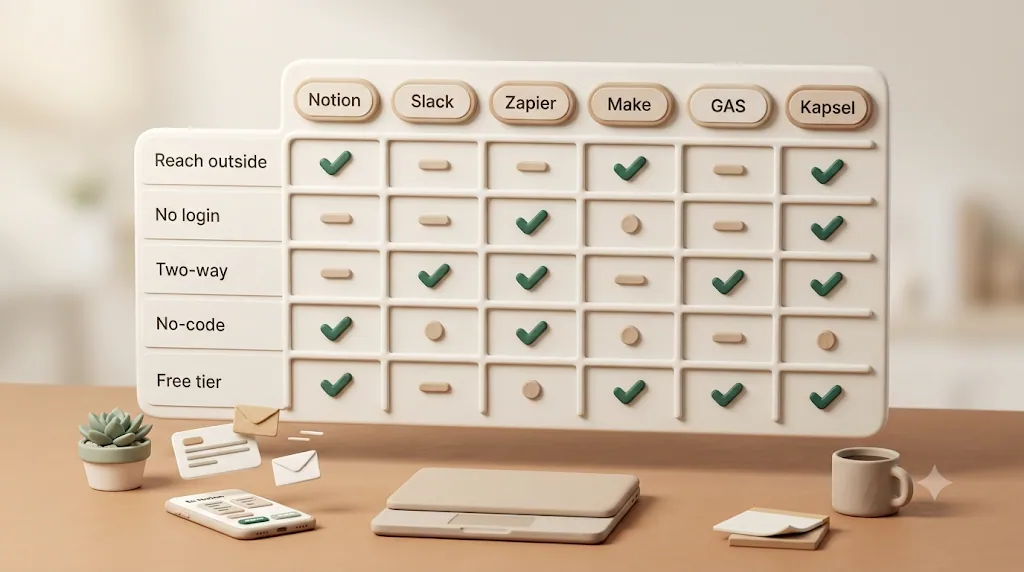
The "best" tool depends entirely on who the reminder is for.
Internal team deadline pings → Slack or native automations
Everyone's already in Notion and Slack, nobody needs a reply logged back, and you want zero extra cost. Native database automations or the Notion–Slack integration cover this cleanly.
Client or vendor updates without giving them Notion access → Kapsel
The recipient has no Notion account and shouldn't need one. You want them to get a clear email and confirm with one click that updates Notion. This is Kapsel's core case—and the one the general-purpose tools aren't built for. More on this in Notion client updates.
Invoice/payment follow-ups that must stop once paid → Kapsel
External, money-related, and unforgiving of mistakes: chasing a paid invoice damages the relationship. Kapsel's "never send to completed/paid items" safeguard is the deciding factor here.
Custom cross-app workflows (multi-tool pipelines) → Zapier / Make
The reminder is one step in a larger chain touching several apps (CRM, spreadsheets, SMS, billing). This is squarely Zapier or Make territory—use Make for lower cost at volume, Zapier for the widest app catalog and gentlest setup.
Developer-maintained one-off scripts → Google Apps Script
You have a developer, want no subscription, and need bespoke logic. Apps Script is the free, fully customizable route—just budget for ongoing maintenance.
How to decide in under a minute (decision checklist)
Or work down this list and stop at the first "yes":
- Does the reminder need to reach someone without a Notion account? → Kapsel (external email, no login) or a custom Zapier/Make/Apps Script email flow you build and maintain.
- Do you need the recipient's reply to update Notion automatically? → Kapsel (one-click write-back built in).
- Must reminders stop for completed/paid items automatically? → Kapsel.
- Is this part of a bigger multi-app pipeline? → Zapier (widest apps) or Make (cheaper at volume).
- Do you have a developer and want zero subscription? → Google Apps Script.
- Is it purely internal, in-Notion, and simple? → Native Notion automations or the Notion–Slack integration.
💡 Most teams end up with more than one of these: native automations for internal nudges, plus a dedicated tool for anything client-facing. They're layers, not rivals.
FAQ
What's the best Notion reminder tool?
There's no single best — it depends on who you need to reach and how much upkeep you'll accept. If everyone is inside your workspace and you want zero setup, Notion's native automations are usually enough. If you need to reach clients or vendors who don't use Notion, want their reply to flow back into Notion, and would rather not maintain a Zapier/Make scenario, a purpose-built tool like Kapsel fits. For fully custom logic on a budget with a developer on hand, Google Apps Script. Use the decision checklist above to match the option to your situation rather than defaulting to the most powerful one.
Can Notion send reminders automatically without me opening the app?
Partly. Notion's reminders push to desktop and mobile and fall back to email—but the email fallback generally only fires when Notion is closed, and push can be missed if it's muted. For a reminder that reliably lands in someone's inbox regardless of whether they use Notion, a database automation's "Send mail to…" action, a Zapier/Make email step, or a dedicated tool like Kapsel is more dependable.
Does Notion support recurring reminders?
Not natively as a repeating reminder. Notion's Date-property reminders and @remind are one-shot around a specific time. To get "remind every week until done," you either build a scheduled Zapier/Make scenario, write a time-driven Apps Script, or use a tool with a built-in recurring-digest mode such as Kapsel.
Can I send a Notion reminder to someone who doesn't have a Notion account?
Native Notion can't—its reminders target workspace members and guests. To reach an outsider you need an email path: a database automation's mail action, a Zapier/Make/Apps Script flow you build, or Kapsel, which is designed to email people with no Notion account and no login required.
How do I get Notion notifications by email instead of push?
Notion sends an email fallback for reminders when the app is closed, and its database automations include a "Send mail to…" action for property-triggered emails. For fuller email control—recurring sends, external recipients, and delivery independent of whether Notion is open—people typically use Zapier, Make, or a purpose-built tool. See Notion email reminders for a deeper look.
Can Zapier trigger off a Notion due date?
Not directly. The Notion API doesn't expose a reliable "due date is approaching" trigger, so Zapier watches for new or updated items instead. To act on a due date you generally run the Zap on a schedule and use a filter to check whether the date is near—an approximation, not a native trigger.
What's the difference between Zapier and Make for Notion automations?
Zapier has the widest app catalog and the simplest step-by-step builder, but bills by task volume and can get pricey at scale. Make (formerly Integromat) prices by operation—usually cheaper at volume—and offers more granular control through modules, iterators, and aggregators, at the cost of a steeper learning curve.
Can I automate Notion reminders without writing code?
Yes. Notion's own database automations, the Notion–Slack integration, Zapier, Make, and Kapsel are all no-code. Coding (via Google Apps Script and the Notion API) is only necessary if you want fully custom logic or want to avoid any subscription.
How do I stop reminders from going out once a Notion task is marked done?
In Zapier or Make you add a filter that checks the status and halts the flow if it's "Done" or "Paid"—but you have to remember to build and test it. Kapsel handles this by default: it never sends to items marked completed or paid, so nobody gets chased for something they've already finished.
Can Google Apps Script read and update a Notion database?
Yes. Apps Script can call the Notion API with UrlFetchApp to read database items and update page properties, using a token stored in Script Properties and a time-driven trigger to run on a schedule. Because it writes as well as reads, it can support two-way updates—if you build and maintain that logic yourself.
Does Notion have a native Slack integration for reminders?
Notion offers a native Slack integration that can surface Notion activity in Slack, and you can extend it with Zapier or Make for more specific reminders. It's excellent for internal, channel-based pings, but it only reaches people who have a seat in your Slack workspace and doesn't write replies back into Notion.
What happens if a Zapier or Make automation breaks — will I know?
Both platforms log runs and can email you on errors, but silent failures are a real, reported problem—a Zap that passes its test step can behave differently on live data, and Make scenarios can stumble on bundle formatting or per-app quirks. There isn't always an obvious signal that a reminder simply didn't go out, which is why a visible send log matters for external-facing reminders.
Is there a tool that lets a client update a Notion task status without logging into Notion?
Yes—this is Kapsel's core feature. Its reminder email includes a one-click confirm that writes the status back into your Notion database, so a client or vendor can respond without ever creating a Notion account or logging in. Achieving the same with Zapier or Make means building and maintaining a separate inbound flow to parse replies or handle webhooks.
Notes
Published 2026-08-04. Feature availability and pricing described here (Kapsel Free $0 / Standard $12 / Pro $29 per month, and the capabilities of native Notion, Slack, Zapier, Make, and Google Apps Script) are current as of writing and may change over time; verify the latest details with each provider before making a decision.